
On a Saturday morning in Fortitude Valley, a cafe customer pulls out her phone and films a flat white arriving at the table. Across town, a northside electrician's customer records the finished work and sends the clip to a neighbour. Both moments are free advertising that goes nowhere, because neither owner has a reliable way to turn them into enquiries.
Why Customer Content Beats a Film Crew
Saturday morning in Fortitude Valley: a customer films her coffee arriving, posts it and tags the cafe. Across town, a northside electrician's customer records the finished switchboard and sends the clip to his brother. Both businesses just earned credible proof for free. Neither owner has a reliable way to turn those moments into enquiries.
A user generated content strategy closes that gap. It is a short, repeatable plan for inviting customer material, checking permission and quality, then placing it where prospective customers make decisions. Customer clips differ from staff-made posts: they carry the weight of a real buyer's experience, while your own content plays a supporting role.
It works like a well-run market stall. The owner doesn't hire actors to demonstrate every purchase. A clear sign, an organised stall and real buyers showing what they bought do the convincing.
For owners who want practical Brisbane digital marketing without a production budget or a full-time social hire, two to four hours a week is a sensible planning allowance to build around. Resources such as Sup's UGC campaigns offer formats worth browsing while you shape your first ask.
The working kit: A blueprint, a simple customer ask, a fair reward, saved permission, a reuse path and a small enquiry-focused scoreboard.
The aim is reviews, credible proof and enquiries, not follower counts.
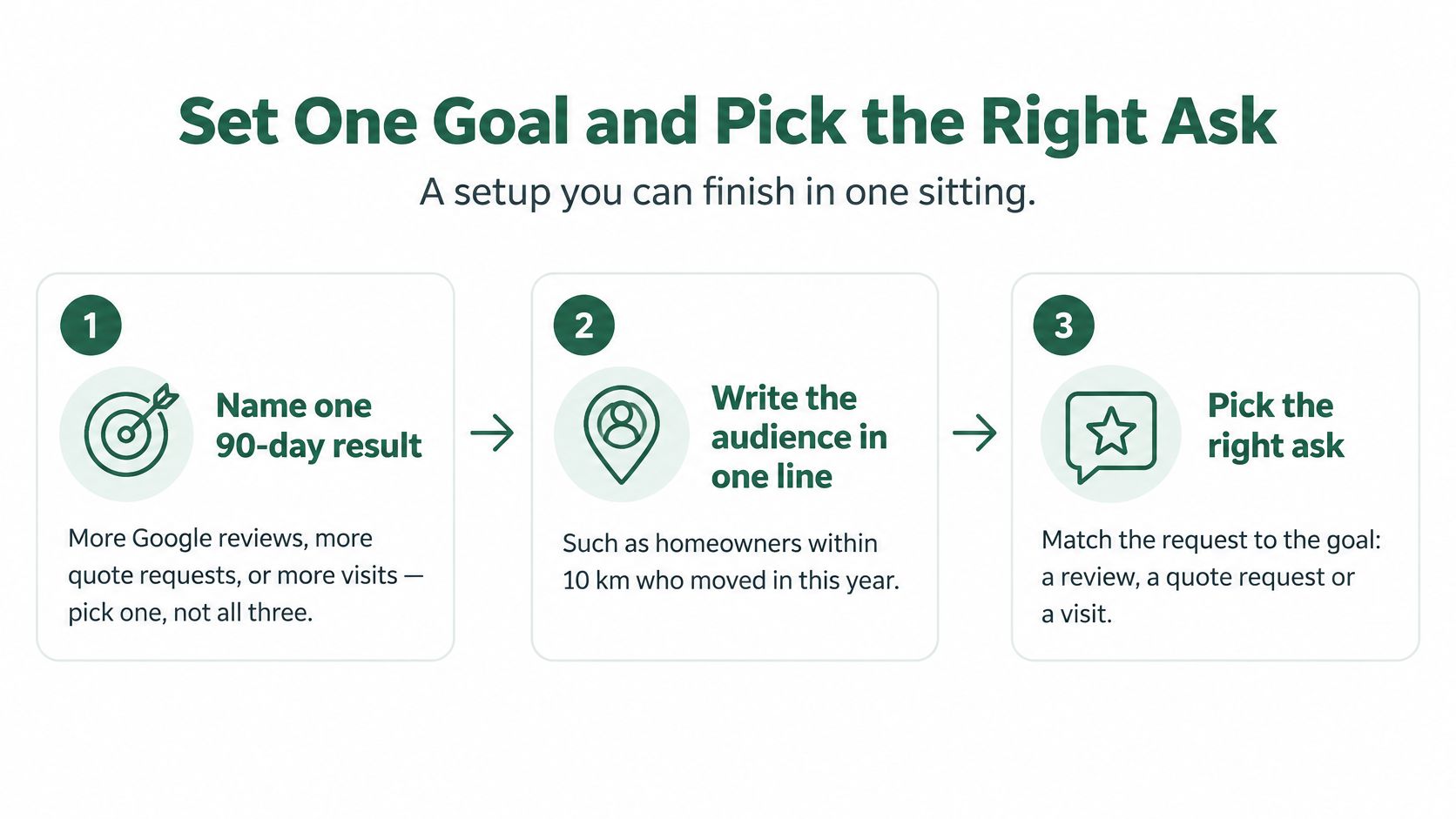
Set One Goal and Pick the Right Ask
Word count: 450
Approach: Instruct
Visual type: infographic
Infographic type: process_flow
Six decisions for a workable start
A UGC system holds together when six decisions are settled before the first request goes out. Work through them in order.
- Choose the result. Pick one 90-day outcome: more Google reviews, more quote requests or more visits. One goal keeps every later decision simple, because a request built for reviews looks different from one built for enquiries.
- Name the audience. Describe the customers most likely to say yes, such as recent hot-water clients or cafe regulars who already photograph their coffee. A practical explanation of user personas can sharpen this description without a lengthy research exercise.
- Match the content. Select the content type that feeds the result directly. Reviews serve trust, finished-work photos serve proof and short testimonials serve enquiries.
- Choose its first home. Decide where each piece lands first: the Google Business Profile, the homepage or the main social account.
- Set the limits. Treat two to four weekly hours and a few hundred dollars a month as a planning ceiling, not a required spend.
- Test the request. Try the wording on one happy regular before printing cards or messaging the whole list. A confusing ask shows up fast in a single conversation.
Requests that customers can answer quickly
The ask should take a customer seconds to understand, and it should carry the permission question inside it. Two wordings that do both:
- Plumber's text: Can we share a photo of the finished bathroom?
- Cafe card: Tag us and we will shout your next coffee if we repost.
Both scripts stay casual and first person, the way an owner would talk at the counter or over text. Note what the cafe offer pays for: a disclosed photo repost. It is not a reward for a positive review, and it should never be framed as one.
Scattered requests create handling work without giving proof a useful destination. A QR code on the counter, a hashtag on the receipt and a review card in the invoice each pull replies into a different inbox. Photos sit unsorted, permissions go unrecorded and nothing lands where a prospective customer will see it. One goal and one first home fix that: every yes has somewhere to go.
Keep the whole setup on a single line you can check at the counter:
Working brief: Goal | Audience | Content type | First channel | Weekly time allowance
A One-Page Blueprint You Can Run This Month
Word count: 500
Approach: Instruct through comparison
Visual type: data-table
Open immediately with the Small-business UGC blueprint table. Label the time and incentive entries as illustrative planning allowances.
| Content type | Best job | Weekly time | Simple incentive | Home channel | Permission |
|---|---|---|---|---|---|
| Google or Facebook reviews | Trust and local search | 20 minutes | Thank-you or loyalty stamp | Google Business Profile and website | Public review; ask before using the name in ads |
| Customer photo of finished work | Proof for a service or product | 30 minutes | Feature plus a small discount | Instagram, Facebook and a website gallery | Written yes before reposting |
| Short video testimonial | Enquiries | 45 minutes | $20 to $50 gift card or free add-on | Reels, homepage and ads | Clear yes for organic use and a separate yes for ads |
| Before-and-after shots | Trades, clinics and beauty | 30 minutes | Monthly prize draw | Website and Google posts | Consent, and hide faces or addresses if not agreed |
| In-store or unboxing clip | Cafes and retail | 20 minutes | Free item | Stories, then a saved highlight | Yes to the brand account and to any paid reuse |
| Staff-filmed moment | Fast capture on the job | 15 minutes | Same-day shout-out | Stories first | Ask on camera or by message before posting |
Place a prominent qualification beside the table: review requests should remain unrewarded; a loyalty stamp must belong to the ordinary loyalty programme rather than depend on submitting a review. Never trade a gift for a scripted five-star endorsement.
Choose by the customer's next decision
Walk through the rows using hypothetical local applications: a plumber's finished bathroom, a clinic's treatment room, a cafe counter and a retailer's unboxing. Distinguish a customer testimonial from a staff-filmed business update.
Explain the workload difference between approving a photo and preparing a video, without presenting the example minutes as measured averages.
Give local searchers useful proof
Describe reviews as supporting trust and local visibility without guaranteeing map-pack placement. Explain how a finished-job photo on a service page helps a Brisbane searcher assess the work, while a Google update supplies timely business information rather than a promised ranking boost.
Apply the combination to the Fortitude Valley cafe counter and northside plumber's bathroom. End with a clear selection task: circle one row and leave the others inactive until that workflow runs reliably.
Collect Stories and Reward People Fairly
Start where customers already share
The easiest story to collect is the one already leaving the customer's mouth. A cafe regular tags the flat white, a plumber hears “that looks brilliant” at handover, a retail customer films the unboxing at home. Build the ask around those moments before you chase anything colder.
Use five collection sources in order of practical ease:
- Existing tags: Respond when a customer has already shared a relevant post.
- The happy handover: Ask while the finished result is still fresh and the customer has just expressed satisfaction.
- Receipts and invoices: Add a QR code or short link that leads to a clear submission request.
- Post-job email: Invite participation after the customer has had time to use the product or service.
- Staff prompts: Give counter and van staff a short, optional invitation they can deliver without slowing the job.
Keep the ask under 30 seconds as a design constraint, not a stopwatch target. Participation should never hold up payment, collection or handover. A customer relationship management record helps you organise follow-up and avoid approaching the same customer every week.
Match the reward to the effort
Think of collection as part of a two-to-four-hour weekly system: less than a lunch shift, split across finding, asking and saving. The reward should match the effort you are asking for, while reviews stay clean.
Incentives that stay fair on a small budget
Keep public review requests unrewarded. A loyalty stamp belongs to the ordinary loyalty programme, not to submitting a review. Never trade a gift for a scripted five-star endorsement.
| Incentive | Cost to the business | Best when | Watch-out |
|---|---|---|---|
| Public thank-you | Nothing | Reviews and loyal regulars | Do not imply the thanks is payment for a positive review |
| Feature on the page or socials | Nothing | Customers who want to be seen | A feature is not permission to reuse the file in ads |
| Loyalty stamp or about 10% off next visit | Low | Repeat local customers | Cap it so the margin still holds |
| Gift card of $20 to $50 | Medium | A short video intended for advertising | Disclose the gift and avoid calling it an independent review |
| Monthly prize draw | Medium | A photo campaign with a clear end date | Publish rules, closing date and winner-selection method |
| Free product or service add-on | Cost of the goods | A substantial testimonial contribution | Do not exchange it for a scripted five-star line |
Treat the dollar figures as example campaign budgets, and keep rewarded photos or testimonials separate from public review collection. Say plainly when a customer received something, keep their account in their own words, and do not hand them praise to repeat.
A workable rhythm is 30 minutes finding posts, 30 minutes asking and 30 minutes saving files and permission records. Leave the rest of the weekly allowance for moderation, publishing and measurement. For a repeat-customer blueprint, pair the happy handover with the loyalty stamp row: ask at the moment of satisfaction, use the ordinary programme reward, and leave the other sources inactive until that loop runs every week.
Permissions Moderation and Quality Checks
Word count: 460
Approach: Instruct
Visual type: ai-image
Save permission before preparing the post
Lead with the required save-ready message:
Can we share this on our page, website and ads? Reply YES and your name.
Immediately explain that a single broad reply shouldn't replace a clearly separated choice about advertising. The permission record should identify the asset, channels, paid use and agreed duration.
Introduce the visual after that substantive explanation:
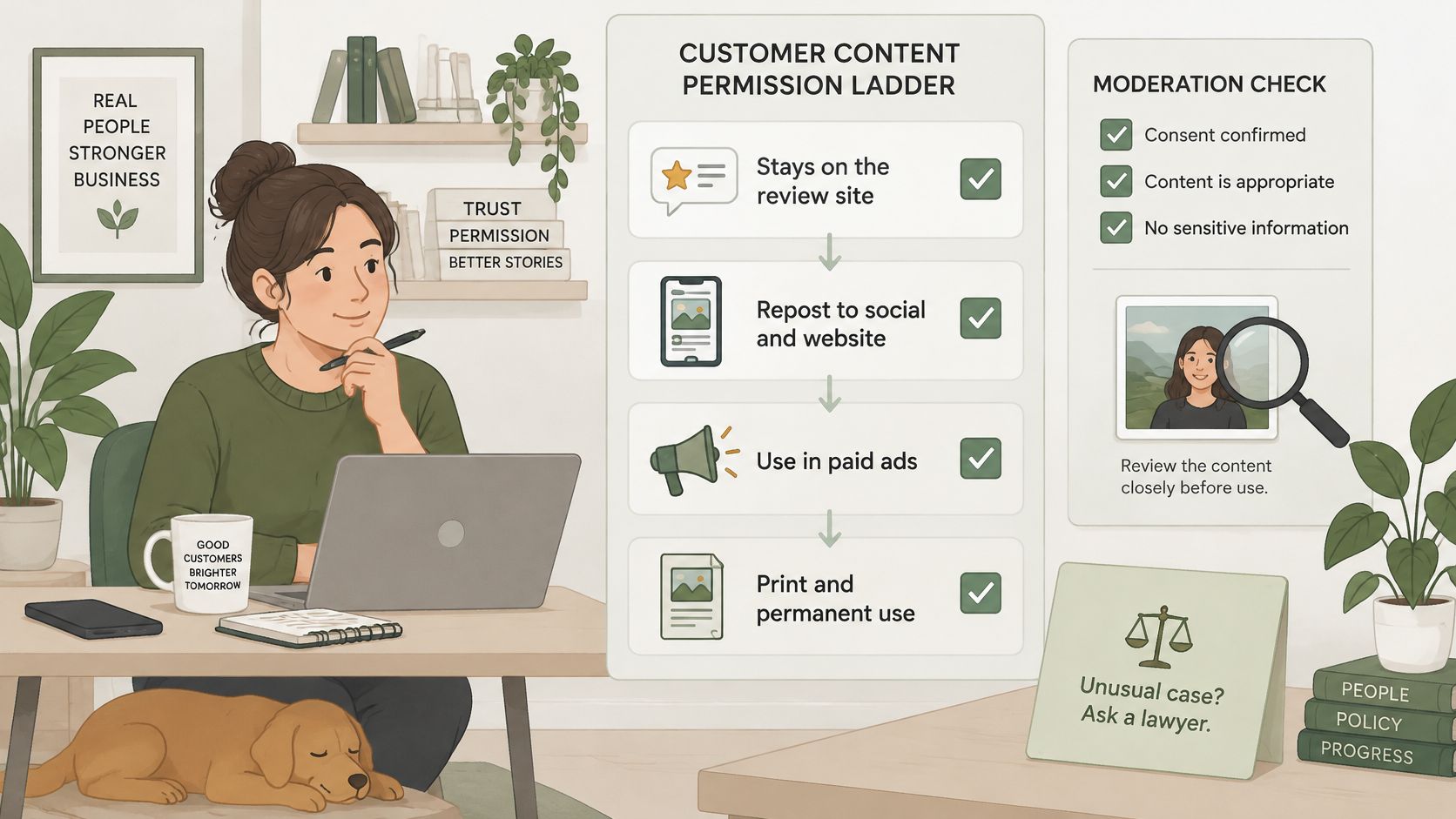
Use a compact permission checklist:
- Public review: Leave it on its original platform unless further reuse is agreed.
- Social repost: Save written approval by text, email or comment.
- Prominent or paid placement: Name website hero images, advertising and billboards explicitly.
- Identifiable details: Obtain appropriate additional consent or crop faces, children, number plates and addresses.
Connect deliberate customer permission with zero-party data, without treating marketing reuse permission as blanket consent for unrelated contact.
Label the checklist practical guidance, not legal advice. Recommend a lawyer for unusual rights, sensitive information or disputed ownership.
Give staff a clear approval standard
Use bullets covering focus, a real product or result, distracting competitor logos, unsafe work, rude language, and personal medical or financial details. Explain that cropping must not misrepresent the result.
Place disclosure guidance here in operational form: record any gift alongside the file so captions and advertising don't conceal the arrangement. Never buy fabricated reviews.
Suggest a 15-minute moderation pass twice weekly as an example schedule. Give four decisions: approve, crop, decline or request clarification.
Treat deleted accounts and withdrawn consent as removal triggers under the proposed business policy, not universal legal rules. Set same-day removal as the intended internal service standard.
Finish with three folder names: yes and ready, needs a crop, and do not use.
Reuse One Piece Across Web Social and Ads
Give one bathroom photo a useful week
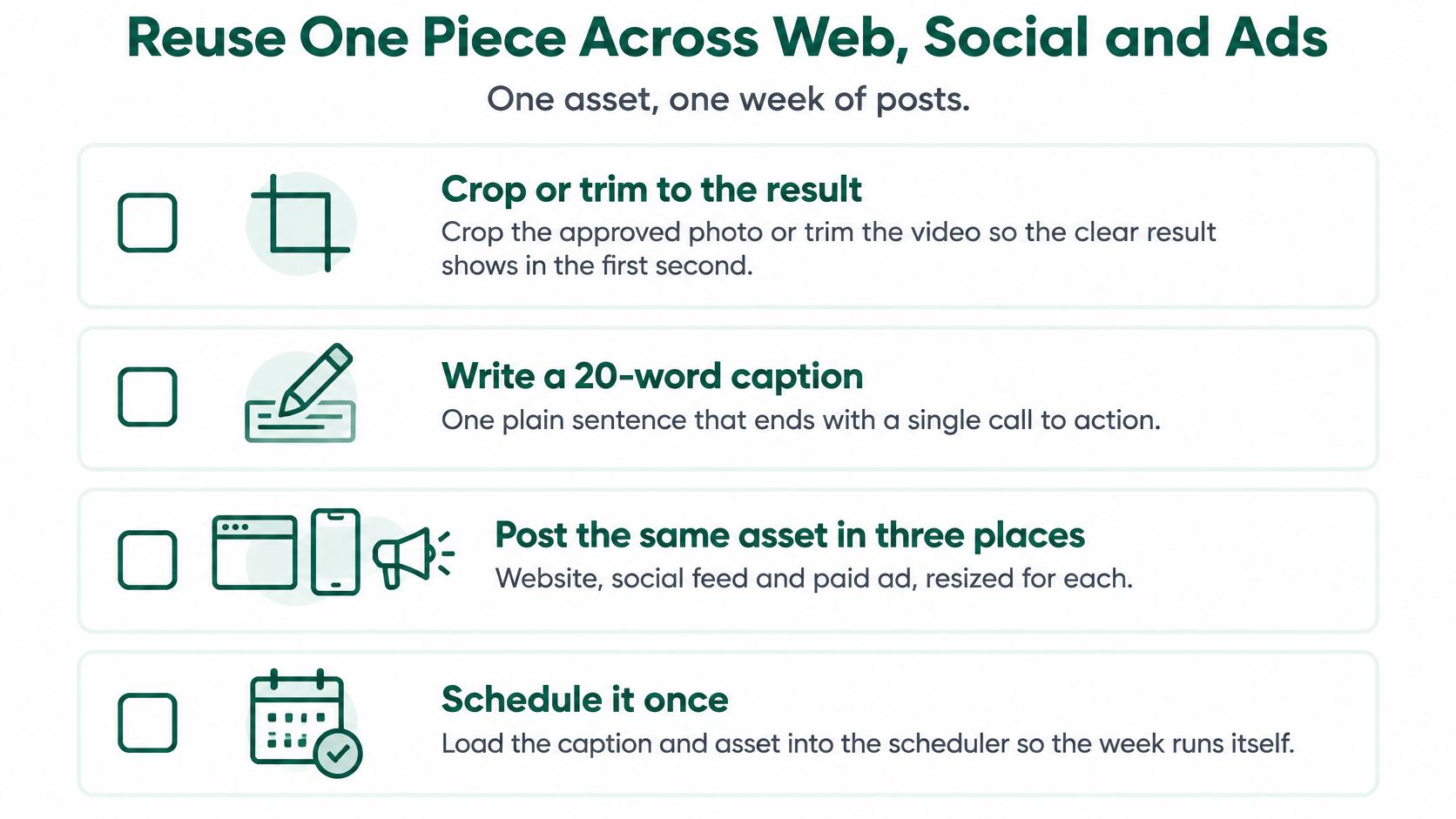
A single approved photo can work a full week across your channels if you plan the reuse before you post. Take a northside bathroom renovation shot as the working example: one image, six steps, roughly two to four hours spread across the week.
- Prepare the result. Crop the approved image or trim the clip so the finished work is the first thing a viewer sees.
- Write the caption. Aim for about 20 words in your own voice, plus a line of context like the suburb and the job type. Write what the business knows to be true rather than guessing what the customer might say.
- Publish where the goal lives. If the goal is enquiries, the photo belongs in your service-page gallery, next to the enquiry form or in a Google Business Profile update, not just in a feed.
- Adapt for social. Post it on your main account with the location and one clear action, such as "call for a quote" or "see more bathrooms."
- Consider a paid test. Shortlist two or three pieces a month as a starting workload. Treat saves, replies and profile visits as screening signals for which piece deserves a small budget, not proof an ad will generate sales.
- Keep the record together. Store the original file, the approved edit and the permission message in one folder named after the job, so anyone on the team can confirm what is cleared for use.
Adapt the placement without inventing the experience
That one bathroom photo can become a website gallery entry, a Google update, an Instagram post and, if the customer has separately approved paid use, a modest Meta ad. The caption stays business-authored context:
Real job in Brisbane's north, shared with permission.
A line like that states a fact about the photo instead of putting words in a customer's mouth. When you weigh up AI-assisted ad production, tools such as the ShortGenius AI UGC ad platform are worth evaluating on their own merits. Generated promotional material is advertising creative, and it should never be presented as genuine customer testimony.
The same photo also needs a different introduction on each channel. Copying identical copy across five networks in an hour reads like a broadcast, not a local business. For help choosing which channels deserve the post and when to run it, social media marketing for small business covers channel selection and scheduling in more detail. One thing never changes with placement: scheduling or resizing the image does not expand the permission the customer granted.
Four approved pieces a month is a workable quota to aim for. Treat it as a starting target for a small team, not an industry minimum or a promised outcome.
Read the Results and Start This Week
Check the signals that connect to business
A customer photo only earns its place if it moves a number you can bank. Reading results works like reading a till: count what came in, not how many people walked past the window. Once a month, inside the same short session you use for the rest of this system, check a four-item scoreboard:
- Reviews: new submissions and the spread of star ratings.
- Enquiries: calls or messages mentioning a customer photo, review or post.
- Site visits: clicks from the social profile or a Google update.
- Advertising efficiency: cost per enquiry when paid campaigns run.
Cost per enquiry is your advertising spend divided by the enquiries you can attribute to it. When attribution is incomplete, report the range rather than forcing a tidy single figure. For a fuller method of tying activity to commercial outcomes, the guide to measuring marketing ROI works through the same logic in more detail. Keep likes off the scoreboard entirely: they show reach, not revenue, and the four items above cover what pays.
A fair example monthly target is a handful of new reviews, four approved assets and one website placement. If submissions stop arriving, change the request or the timing before adding spend. If content arrives without enquiries, test placing the strongest relevant proof near the enquiry button, since that is the moment a hesitant visitor decides whether to call.
Start with a manageable first week
The first week fits inside the two-to-four-hour weekly pass this strategy runs on:
- Day one: Select the blueprint row and complete the working brief.
- Day two: Save the permission wording and the separate paid-use choice.
- Day three: Approach three recent satisfied customers for appropriate content, without restricting public review invitations to positive experiences.
- Day four: Create the approval folders.
- Day five: Publish the first approved piece on its chosen home channel.
- Day seven: Identify one awkward step and change only that.
Day six carries no task, which keeps the system forgiving: a busy shift or a sick day costs you nothing, because nothing was scheduled to break.
If you would rather approve content than chase it, hand the weekly pass to Boocoo. The team is Brisbane-based rather than a faceless offshore agency, so the person running your accounts understands the local market your customers live in. Each client's strategist maps a 90-day plan around their industry, location and budget, and the social media management service covers strategy, content creation and community management, so the asking, collecting and publishing keep moving while you run the business.
One goal, one ask, a saved yes, and a place on the site.