
A Brisbane business owner usually notices website maintenance when something goes wrong. The contact form stops sending. A plugin update breaks the layout. The site loads slowly on mobile just when a potential customer is ready to book. What should feel like a reliable staff member starts acting like a risk.
That's why web maintenance in Brisbane matters so much for small businesses. It isn't about polishing a site for the sake of it. It's about protecting enquiries, keeping bookings coming through, and making sure the website keeps doing its job while the business owner focuses on running the business.
A local electrician, clinic, consultant, or shop doesn't need another technical headache. They need a website that stays online, stays secure, and keeps converting visitors into real conversations. Good maintenance turns that from a hope into a routine.
Small issues rarely stay small for long. A missed update can become a security problem. An unnoticed error can block leads for days. A slow page can frustrate mobile visitors who never come back. That's why a practical maintenance plan saves both time and stress.
Your Website Should Be Your Best Employee Not a Liability
A small business website should work the late shift without complaints. It should answer questions, collect leads, support bookings, and reassure people that the business is legitimate and organised. When it fails, the business owner feels it immediately.
A common Brisbane scenario goes like this. Someone pays for a website build, launches it, and assumes it's handled. A few months later, the homepage looks fine, but the enquiry form has stopped. No one notices until a customer mentions it by phone. By then, the owner is left wondering how many leads were missed.
That's the actual cost of neglect. Not just a technical glitch, but wasted marketing spend, interrupted enquiries, and the stress of trying to find out what broke.
A website doesn't need constant fussing. It does need someone responsible for keeping it safe, stable, and usable.
Security is part of that picture too. For WordPress sites in particular, business owners are wise to follow practical guidance such as FirePhage's WordPress security advice, which covers the sort of protective habits that reduce avoidable risk.
Maintenance also connects directly to sales performance. A site can be live and still underperform if pages are clunky, calls to action are weak, or forms create friction. That's why website upkeep and conversion rate optimisation in Australia often belong in the same conversation.
A website becomes a liability when nobody owns the basics
Most owners don't need to know how PHP works or how a database is structured. They do need clarity on a few business-critical questions:
- Are enquiries still coming through: Contact forms, booking tools, and checkout steps need regular testing.
- Is the site still secure: Themes, plugins, and core software can become weak points if left untouched.
- Is the site still fast enough to trust: A sluggish mobile page can make a business look less credible than it really is.
- Can the site be restored quickly: If something fails, backups and a recovery process matter more than blame.
Web maintenance Brisbane services should solve those questions before problems become visible to customers. For a time-poor operator, that's the difference between a site that dependably supports the business and one that keeps creating avoidable admin.
What Is Web Maintenance Really For a Brisbane Business
Web maintenance keeps a business website working when it matters. For a Brisbane owner, that usually means protecting enquiry flow, preventing avoidable downtime, and making sure the site can be recovered quickly if an update, plugin conflict, or security issue causes trouble.
That is a different job from occasional edits. A maintenance plan is ongoing operational support for the parts of the website that affect revenue, customer trust, and day-to-day admin.
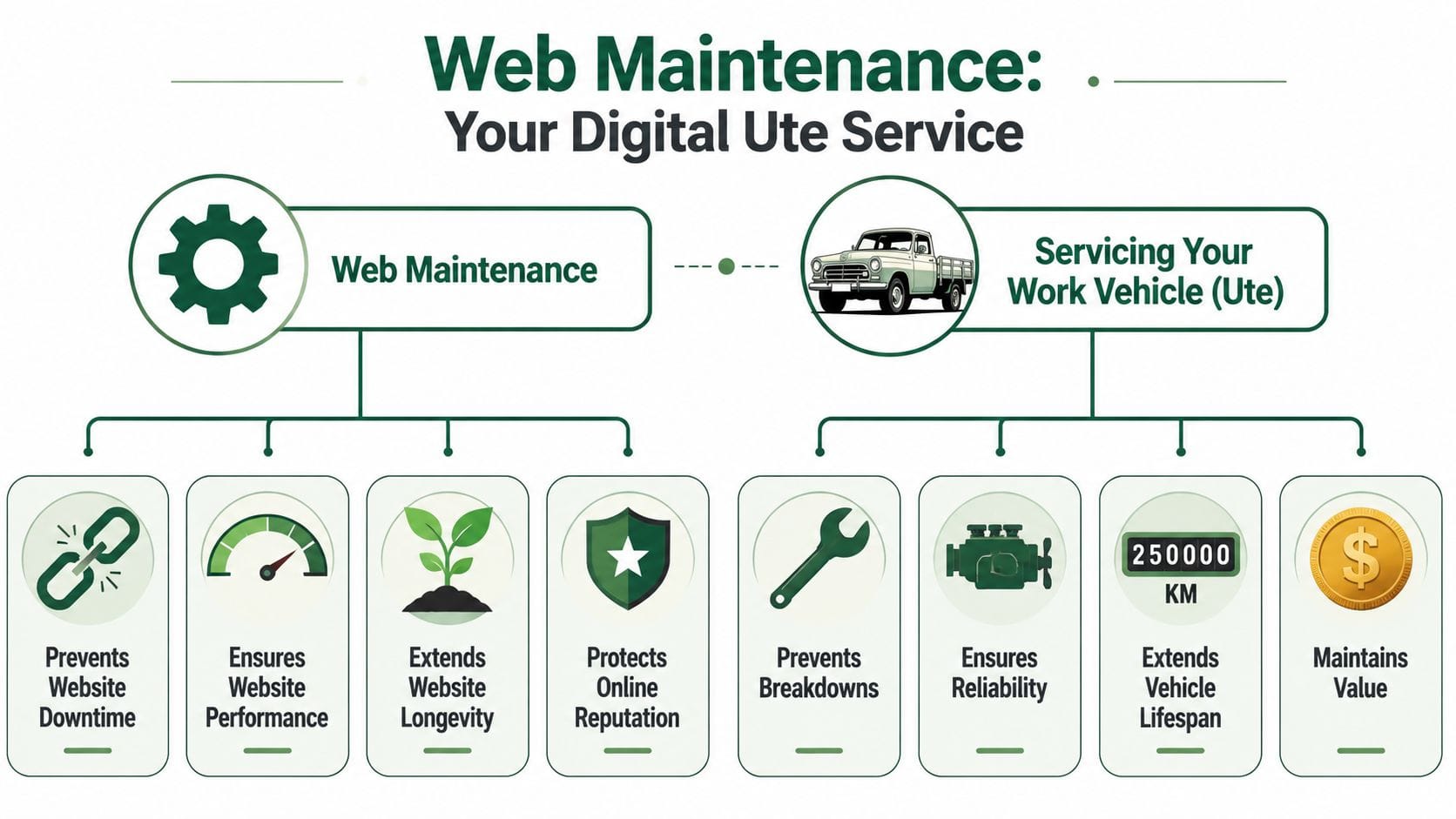
A practical way to judge maintenance is to ask one question. What breaks in the business if the website stops doing its job for half a day?
For some Brisbane businesses, the answer is not much. For others, it means missed quote requests, failed booking forms, unpaid invoices, confused customers, or a sales team following up leads that never arrived. That is why maintenance should be treated as business continuity work, not just technical housekeeping.
The security risk is real, but the bigger issue for many small operators is interruption. A vulnerable plugin can expose the site. A failed update can take out a contact form. A hosting problem can make the site unavailable during business hours. A guide from Perfection Geeks notes that routine maintenance helps with patching software, monitoring security, and supporting recovery if something goes wrong, according to this guide from Perfection Geeks.
There is also a less visible layer to maintain. If customer emails stop landing or the domain starts looking untrustworthy, the website can appear healthy while leads still go missing. In that case, it helps to assess your domain's health before the problem spreads into enquiries and follow-up.
What maintenance protects in practical terms
Good web maintenance Brisbane services turn technical tasks into business protection:
- Software updates keep forms, login areas, and page templates working properly and reduce exposure to known vulnerabilities.
- Backups give the business a recovery path after bad updates, malware, user error, or hosting faults.
- Security monitoring helps catch unusual activity early, before a customer sees spam pages, redirects, or warnings.
- Performance checks keep mobile pages loading properly, which matters because many local customers visit from their phones first.
- Function testing confirms the actions that generate revenue still work, including enquiry forms, booking systems, carts, payment steps, and click-to-call buttons.
The trade-off is straightforward. Skipping maintenance saves a little money this month. Fixing a broken site, cleaning malware, restoring lost data, or chasing missed leads usually costs more.
Businesses that depend on Google visibility also need the website to stay technically sound. Broken pages, slow load times, indexing issues, and recurring errors can weaken lead generation over time. That is why maintenance and search engine optimisation often sit close together in real business work, even when they are quoted as separate services.
Brisbane Web Maintenance Packages and Realistic Costs
Most small business owners don't ask whether maintenance costs money. They ask what a sensible budget looks like and what they'll get for it.
In Brisbane, that range is broad for a reason. Some businesses only need basic upkeep. Others need active support, content help, monitoring, and regular technical attention because the site plays a bigger role in sales.
According to this Brisbane maintenance pricing guide, typical website maintenance costs range from AU$200 to AU$900 per month, while retainer-based support can range from AU$150 to AU$2,000 per month. The same guide notes a common rule of thumb that maintenance may equal 10% to 15% of the original website build cost per year.
What the lower end usually covers
At the lower end, the service is usually about keeping the lights on. That often suits brochure-style sites with a modest number of pages and no frequent content changes.
Typical inclusions might look like this:
- Core upkeep: Plugin, theme, and platform updates.
- Basic backups: Scheduled backups with some restore support.
- Security checks: Monitoring for obvious issues or vulnerabilities.
- Small fixes: Minor troubleshooting if an update causes a problem.
That type of package can be enough for a local accountant, tradie, or consultant whose site mainly exists to support credibility and collect enquiries.
When a higher support level makes sense
A higher monthly spend usually reflects more hands-on work. That might include content edits, uptime monitoring, performance optimisation, testing, reporting, and priority support when something breaks.
This level makes sense when the site is closely tied to revenue. Examples include:
- A clinic with booking forms and service pages
- An eCommerce store with product updates
- A builder relying on lead forms from local search
- A growing firm regularly publishing new content
Another Brisbane-focused provider lists plans starting from around AU$2,200 plus GST per month when maintenance includes active support, content updates, uptime monitoring, security work, and performance optimisation, as described in the earlier verified pricing summary.
| Service Tier | Typical Tasks Included | Ideal For | Estimated Monthly Cost (Brisbane) |
|---|---|---|---|
| Basic Health Check | Software updates, backups, basic security checks, minor fixes | Small brochure sites with limited changes | AU$200 to AU$900 |
| Retainer Support | Ongoing fixes, content help, technical support, broader maintenance coverage | Businesses needing recurring help across the month | AU$150 to AU$2,000 |
| Managed Care | Content updates, uptime monitoring, security work, performance optimisation, hands-on support | Sites that directly support steady lead flow or sales | Around AU$2,200 plus GST per month at the starting-plan example noted above |
Cheap maintenance often means someone will only react after the problem is visible. Useful maintenance includes prevention, testing, and a recovery process.
A practical buying test is this. Ask what happens after an update fails on a Tuesday morning. If the answer is vague, the quote is probably too thin.
Small businesses reviewing a rebuild or support plan can also compare maintenance needs with broader website services so they don't end up paying separately for tasks that should already be accounted for. The goal isn't the cheapest line item. It's paying for the level of support the business depends on.
A Practical Website Maintenance Checklist
A checklist is useful because it turns fuzzy promises into visible tasks. If a provider says they “look after everything” but can't show what that means, the business owner is buying hope.
A stronger maintenance setup includes the technical controls that reduce downtime and speed up recovery. One Brisbane provider explicitly includes real-time uptime alerts, malware scanning and removal, server health monitoring, PHP, Nginx and MySQL updates, and daily backups in its stability plan, which shows what a mature maintenance program can look like in practice in these website maintenance packages.
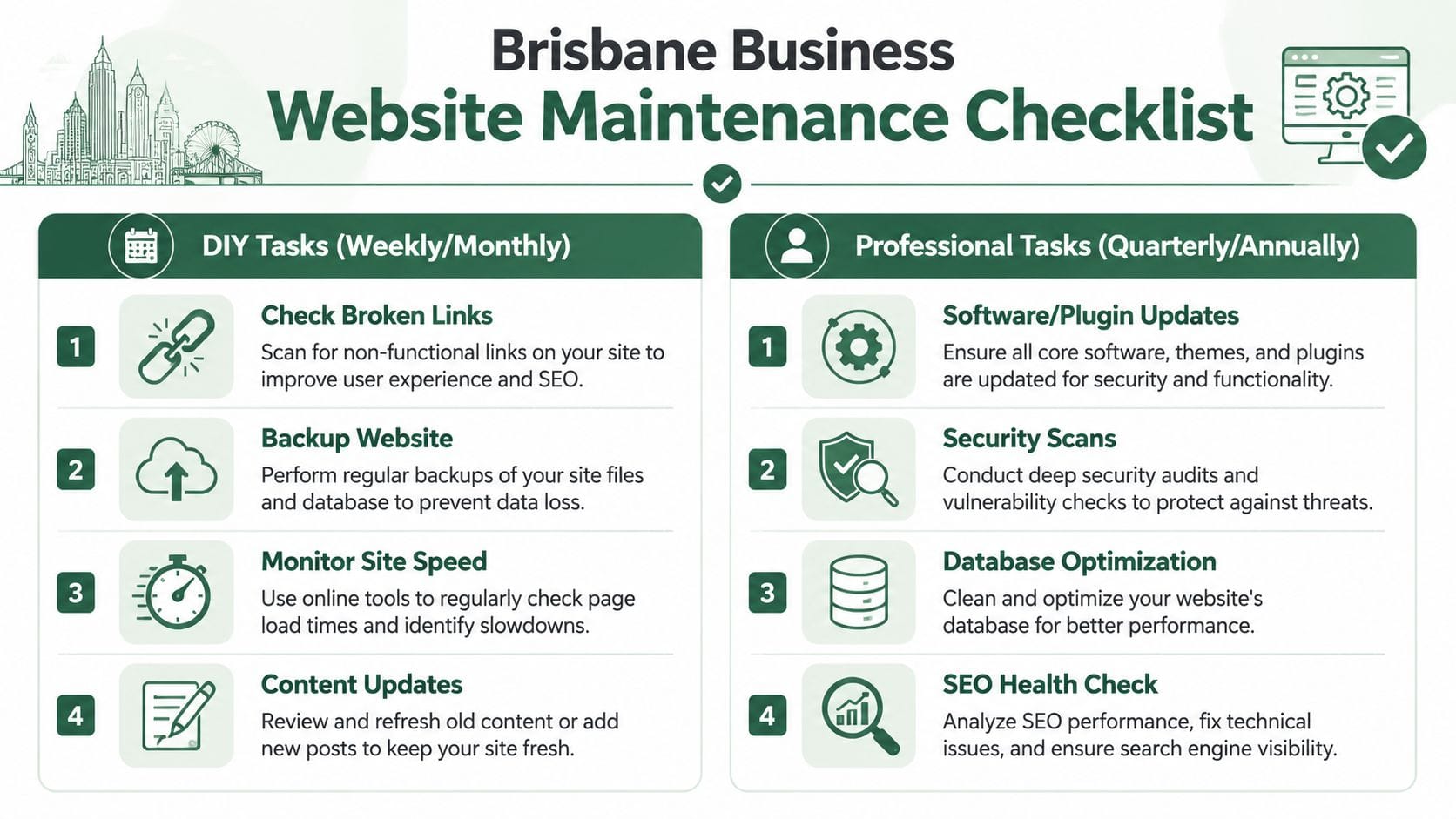
Tasks a business owner can usually handle
Some jobs don't need a developer. They just need consistency.
- Check the forms: Submit the main contact form and make sure the message arrives where it should.
- Review key pages on mobile: Homepage, service pages, and contact page should still look clean and load properly.
- Spot obvious broken links: Click through the main menu, footer links, and common calls to action.
- Update business details: Trading hours, staff changes, service areas, and pricing notes should stay current.
- Scan for visual issues: Missing images, layout glitches, and odd spacing often appear after updates.
These checks are simple, but they protect revenue. A phone number that doesn't tap correctly on mobile or a form that fails unnoticed can cost more than most owners realise.
Tasks that are better handled by a professional
Other jobs affect site stability more directly. They're worth handling carefully, especially on a live business website.
Apply updates in a controlled way
Updating WordPress core, themes, plugins, or server components without testing can create conflicts. A professional should know how to stage, test, and roll back if needed.Run malware checks and cleanup
If a site is compromised, deleting one suspicious file rarely solves the root problem. Proper scanning and removal matter.Monitor uptime and server health
It's one thing to discover an outage from a customer. It's much better when alerts flag a problem immediately so action can start before business hours are heavily affected.Manage daily backups and restores
Backups only matter if they're recent and usable. A provider should be able to restore the site cleanly and quickly.Update runtime components
PHP, Nginx, and MySQL updates sit underneath the website itself. They affect compatibility, performance, and security. Mishandling them can break the site.Optimise the database and troubleshoot slowdowns
If the site gradually becomes sluggish or admin tasks start dragging, this usually needs technical investigation rather than guesswork.
A backup strategy isn't finished when the backup runs. It's finished when a restore has been proven to work.
For a Brisbane SME, a practical checklist should answer three questions. Can the site stay online, can the site recover fast, and can customers still complete the actions that matter. If a maintenance quote doesn't clearly cover those outcomes, it's incomplete.
How to Choose the Right Web Maintenance Provider in Brisbane
Choosing a provider gets easier once the owner stops looking for “someone who can update WordPress” and starts looking for someone who can protect continuity and support lead generation.
That's the modern shift in web maintenance Brisbane. Basic updates still matter, but they're no longer the full job.
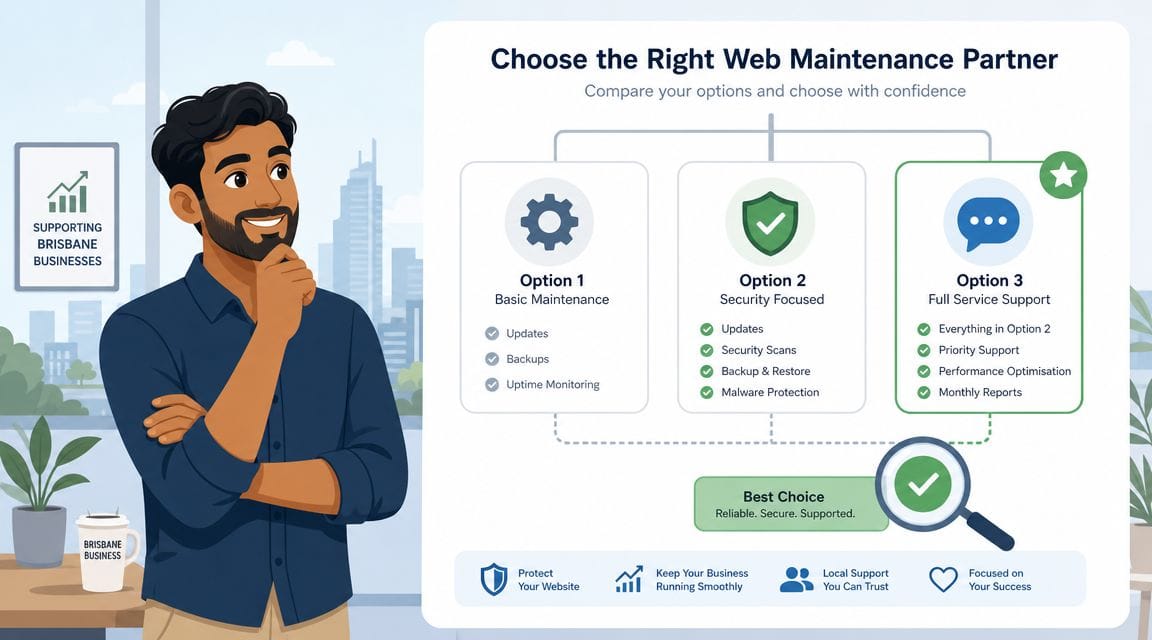
One Brisbane-focused source notes that maintenance priorities now extend beyond standard updates to include performance, accessibility, and content structure for AI-assisted search, framing maintenance as revenue protection and continuous improvement rather than just technical housekeeping in this website update and maintenance overview.
Questions worth asking before signing anything
A solid provider should answer these clearly, without hiding behind jargon.
- What happens if the site goes down unexpectedly: Ask about alerts, response process, and first steps.
- How do they handle failed updates: Good providers plan for rollbacks and testing.
- Do they test forms and critical functions: Updating software without checking enquiry paths isn't enough.
- How do they report work completed: A short monthly summary is better than silence.
- How do they address speed, accessibility, and content structure: These areas increasingly affect visibility and usability.
- Who is doing the work: Outsourcing isn't automatically bad, but accountability should be clear.
For businesses reviewing infrastructure choices as part of a wider support plan, it can also help to compare top cloud providers so hosting and maintenance decisions aren't made in isolation.
Red flags that usually lead to trouble
Some warning signs show up early.
- Vague promises: “Unlimited support” sounds good until no one defines what support includes.
- No written scope: If tasks, response expectations, and exclusions aren't documented, disputes are likely.
- No mention of recovery: Providers who only talk about updates and not restoration are missing half the job.
- No discussion of performance or accessibility: That usually signals an outdated view of maintenance.
- One-size-fits-all packages: A brochure site and a lead-driven service business rarely need the exact same support model.
The right provider doesn't just keep the website alive. They keep it useful.
A business owner comparing options might look at agencies, specialist WordPress maintainers, or broader digital partners. For example, Boocoo offers website support as part of its wider digital services, which may suit businesses that want maintenance handled alongside design, SEO, or content changes. That won't suit every company, but for some SMEs it reduces handoffs and admin.
The best fit is usually the provider that can explain trade-offs plainly. If they can show what gets checked, what gets fixed, and what happens during an urgent issue, the owner is already dealing with someone more practical than average.
Frequently Asked Questions and Your Next Step
Small business owners usually end up with the same final questions. The answers don't need to be complicated.
Can a small business do its own maintenance
Yes, some can. If the site is simple, rarely changes, and the owner is organised enough to test forms, apply updates carefully, monitor issues, and keep backups current, DIY can work for a while.
The problem is consistency. Maintenance is easy to postpone when the week gets busy. That's often when preventable issues slip through.
How often does a website need maintenance
A business website needs regular attention, not occasional rescue work. Some checks should happen frequently, especially around uptime, forms, security, and backups. Other work, such as deeper technical reviews, can happen on a planned schedule.
The right cadence depends on how much the site changes and how important it is to daily operations. A site that generates leads needs closer attention than a static online brochure.
What is the difference between hosting and maintenance
Hosting is the space and infrastructure that keeps the site online. Maintenance is the ongoing work that keeps the site functioning properly within that environment.
A simple way to think about it is this. Hosting gives the website a place to live. Maintenance makes sure it stays healthy, secure, and usable.
Is web maintenance worth paying for if the site seems fine
Usually, yes. Most maintenance value comes from preventing the issue that hasn't happened yet or catching the one the owner hasn't seen yet.
That's particularly true for businesses that rely on forms, bookings, or search visibility. If the website helps bring in work, protecting it is a business decision, not just a technical one.
A quiet website is not always a healthy website. Sometimes it's just a problem that hasn't been noticed yet.
For a Brisbane business owner, the next step is simple. Review what the website is responsible for. If it supports enquiries, appointments, or sales, list the functions that can't afford to fail. Then compare that list against the current maintenance setup.