
You're between jobs, or you've just closed the till, and the phone still isn't ringing the way the ads promised. The Instagram account looks busy. Search brings people in. The booking page, the quote form, or the checkout still turns only a handful of those visits into something you can invoice. Brisbane digital marketing often stops at getting seen. Conversion rate optimization starts with the visitors you already paid for, in time or in ad spend, and asks how many of them take action.
What Conversion Rate Optimisation Means for Your Business
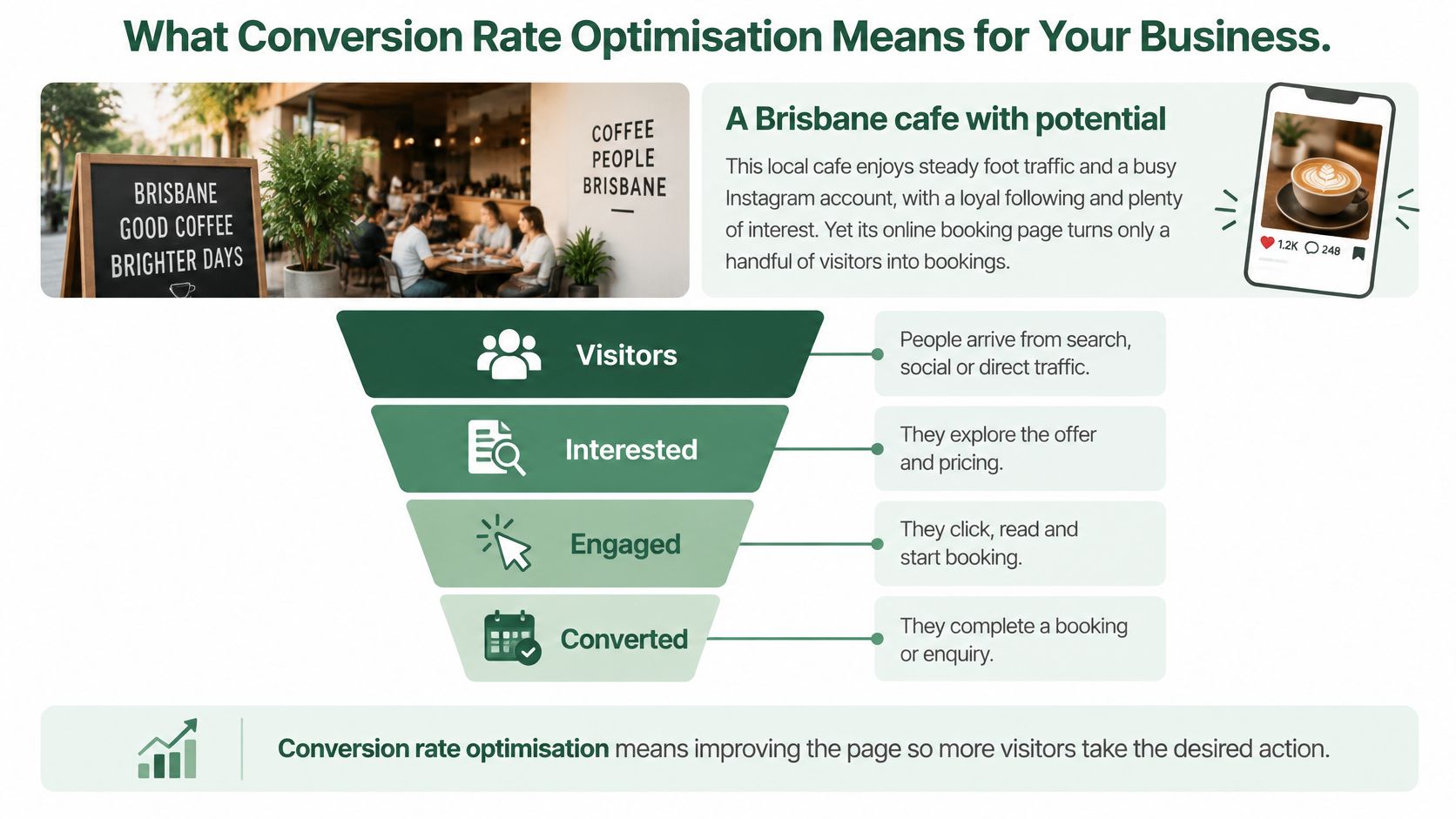
Say a Paddington cafe has steady foot traffic and a full Instagram grid, yet the online booking page turns only a handful of visitors into tables. The owner doesn't need more posts first. The owner needs more of the people who already opened that page to finish a booking.
Conversion rate optimisation means improving the share of existing visitors who take a valuable action, such as booking, calling, requesting a quote, or buying.
The formula is simple. Conversion rate = conversions ÷ visitors × 100. A plumber with 400 website visits and 12 enquiries has a 3% conversion rate. Twelve divided by 400 is 0.03, and 0.03 times 100 is 3. That number is a starting line, not a grade.
Think of traffic as people walking past your shopfront. Conversion work is the sign, the open door, and the clear counter that get more of them to step inside and ask for help. A brighter sign doesn't help if the door sticks.
The work goes past button colour. Headlines, forms, trust signals, service-area details, and the mobile layout all decide whether someone finishes. Australians already shop this way at scale. Australia Post reported that Australians spent a record A$69 billion online in 2024, and 17.08 million Australians used online-shopping websites monthly, 45% more than in 2020. A weak page can miss demand you already attracted.
Trades sites face the same maths. If you want a worked example of how a roofing business can track and test roofing website conversions, treat that as a checklist for calls and quote forms, not as a template to copy.
When a prettier page won't help
Polishing a page can't fix three problems. You have almost no traffic. The offer is unclear. Customers don't want the product at that price or in that suburb.
Write down last month's visits and conversions, then calculate your rate this week. One number on paper beats a hunch about "the website not working."
Metrics to Track Before You Change Anything
Change nothing until three rules are in place. Track one primary outcome, such as a qualified enquiry, a booking, or a paid order. Split results by device and traffic source. Compare the result with your own baseline, not an overseas average that doesn't match Brisbane prices, seasons, or how people search for a local trade.
A blended rate hides trouble. A desktop page can look healthy while the mobile form fails, and a single sitewide percentage will congratulate you for the wrong thing.
How to read a benchmark without chasing it
An Australian e-commerce benchmark in the Australia Post 2025 ecommerce report recorded an average conversion rate of 1.78% in September 2024, after three monthly declines, and 2.03% during November–December 2023. At 10,000 visits, that's about 178 orders in the quieter month and 203 orders in the busier one. Same traffic, 25 extra orders, because the calendar changed. One good month is not proof your headline worked.
For a service business, separate organic-search visitors from paid-ad visitors, and separate mobile form completions from phone calls. A conversion rate counts completed outcomes against all visits. A form completion rate counts submissions against people who opened the form. Phone calls need a call-tracking number or a manual tally, or they vanish from the maths.
In 2024–25, only 7% of Australian businesses reported measuring how digital activity contributed to overall performance, more than double the 3% in 2021–22, according to the Australian Bureau of Statistics. A short spreadsheet puts you ahead of that habit.
| Metric | How to calculate it | What it tells you |
|---|---|---|
| Conversion rate | Conversions ÷ visits × 100. Example: 12 enquiries from 400 visits = 3%. | Overall share of visitors who act. |
| Form completion rate | Form submissions ÷ form page views × 100. Example: 8 submissions from 40 form views = 20%. | Whether the form itself creates friction. |
| Call rate | Tap-to-call clicks ÷ visits × 100. Example: 15 taps from 400 visits = 3.75%. | How many visitors prefer to phone. |
| Cost per enquiry | Ad spend ÷ enquiries. Example: $600 spend and 12 enquiries = $50 each. | Whether paid traffic is worth the budget. |
| Average order value | Revenue ÷ orders. Example: $4,200 revenue and 28 orders = $150. | Whether an online shop should focus on value or volume. |
| Bounce rate | Single-page sessions ÷ total sessions × 100. Example: 180 single-page sessions from 400 = 45%. | Clues about page relevance, not a success measure. Read what bounce rate means before you treat a high figure as failure. |
A 15-minute monthly routine
On the first working day, open a spreadsheet with four columns: visits, enquiries, booked jobs, and conversion rate. Update it in about 15 minutes. Note holidays, sales, and ad changes in a fifth column so you don't credit a quiet week to a button.
Practical rule: Repeat the check for a second comparable month before you call a change a win. Seasonality can move the rate when you changed nothing at all.
Choosing Which Fix to Test First
A small team has time for a few tests a quarter, not twenty. Prioritisation is a budget decision. The ICE score keeps opinion from eating the week.
Impact asks how much the change could move the conversion rate. Confidence asks how sure you are, from analytics, enquiry emails, or questions customers already ask. Ease asks how quickly current staff can ship it with the tools you have. Score each from 1 to 10 and multiply. A weak score on any one factor pulls the total down, which is why a full redesign loses to a four-field form.
| Idea | Impact | Confidence | Ease | ICE (product) |
|---|---|---|---|---|
| Shorten mobile enquiry form to four fields | 8 | 7 | 9 | 504 |
| Add phone number to the top of every service page | 6 | 8 | 10 | 480 |
| Rewrite the homepage headline | 5 | 4 | 7 | 140 |
| Redesign the whole website | 9 | 3 | 1 | 27 |
The short form wins because you can finish it this week and you already suspect mobile friction. The redesign scores high on hope and almost zero on ease, so it waits.
Why mobile forms rise to the top
One Australia-focused benchmark from Rocking Web puts mobile conversion at about 2.0% against 3.0% on desktop. That gap is directional, not a target. Category, price, device mix, and traffic source all change the result. Still, if most of your visits are on phones, a cramped form is a fair first test. Compare mobile and desktop by landing page and source before you rewrite the whole site.
You don't need paid software to gather evidence.
- Form logs: Read the last month of enquiries and note repeated questions, such as suburbs or response time.
- Free heatmaps: A free tier, such as Microsoft Clarity, shows where people tap and where they stop.
- Three short calls: Ask recent customers what nearly stopped them enquiring. Write the answers beside your ICE list.
A user persona helps here only if it names a real job, a real suburb, and the question that person asks before they trust you. A fictional "busy mum, 35" doesn't change the form.
Ship the highest-scoring idea you can finish this week. Re-score the whole list each month after you see the spreadsheet, not before.
How to Run a CRO Test Step by Step
A test is a fair comparison, not a guess. These steps keep the comparison honest, and each one ends with something you write down.
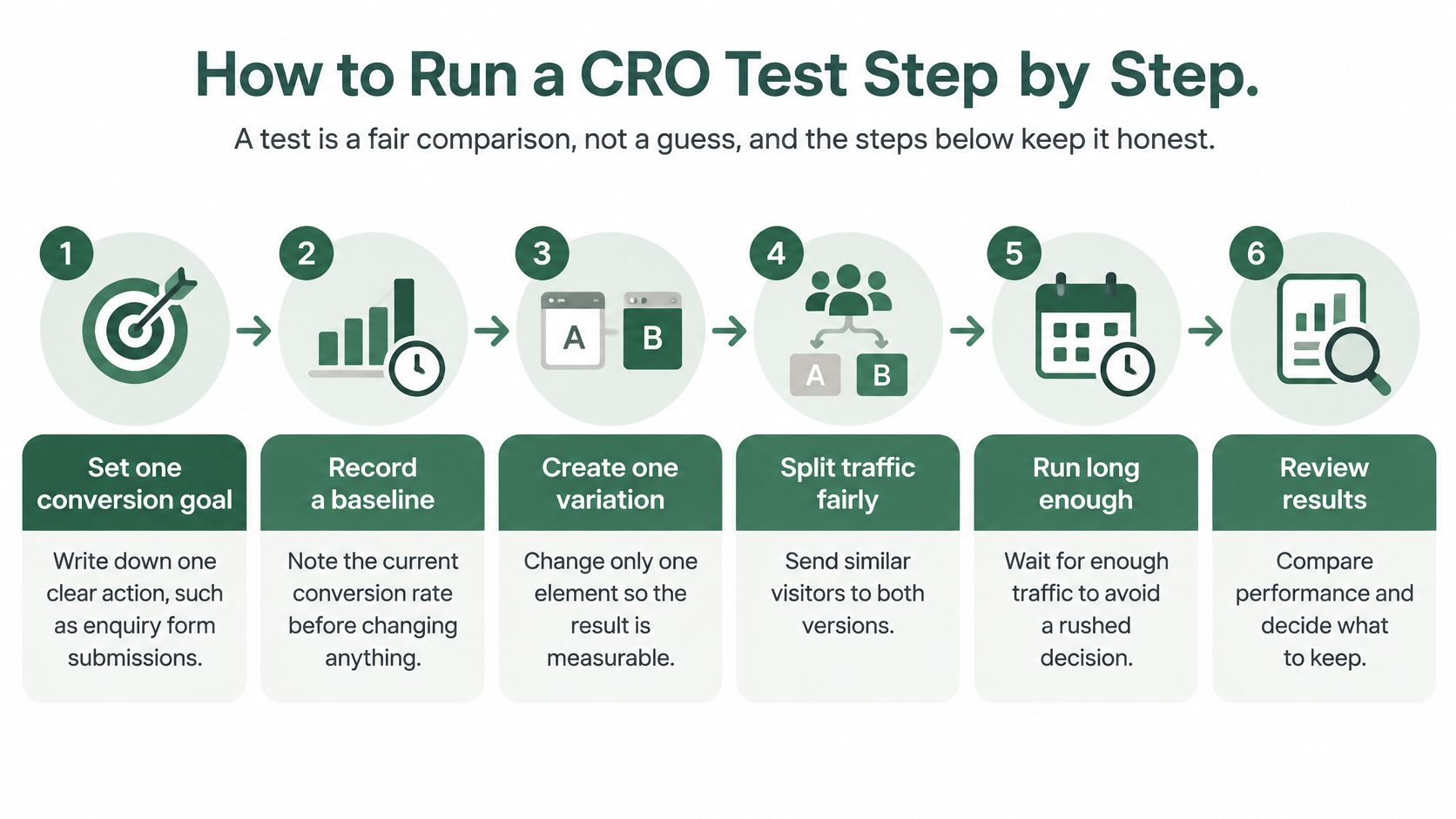
- Set one conversion goal. Pick enquiry form submissions, bookings, or sales, and write that goal at the top of the sheet. One goal stops you declaring victory because page views rose.
- Record a baseline for two to four weeks. Note the current rate, plus any sale, holiday, or ad change. Without that note, next month's lift has no fair partner.
- Find the friction. Use analytics, screen recordings if you have them, and the questions people already ask by phone. Log the step where they hesitate, not the page you dislike.
- Write a one-sentence hypothesis. Example: if the form shows the service area, more Brisbane visitors will finish it because they know they are in range. Record the sentence before you edit.
- Change one thing only. A new headline and a shorter form at the same time leave you guessing which one moved the rate. Record the exact edit and the date.
- Split traffic, or compare periods carefully. An A/B test shows half your visitors the current page and half the changed page, then compares which version produces more enquiries. Low-traffic sites can run a before-and-after comparison if the traffic sources stay the same. Record which method you used. A focused landing page is often the cleanest place to run that split, because the page has one job.
- Keep the test running. Wait until you have enough visitors to trust the result. Checking daily and stopping on a lucky Tuesday wastes the baseline. Record the start date and the planned end date.
- Keep, roll back, or retest. Log the result, the traffic source, and whether lead quality held up. A cheaper enquiry that never books is not a win.
When a formal split will take months
If you get only a few hundred visits a month, a formal A/B test may run for months before the numbers settle. Use the before-and-after method, keep sources steady, and treat the result as a strong signal, not proof. If you want an outside view of the path from visit to enquiry, you can audit your conversion funnel and then apply only the steps that match your traffic.
Don't stop a test because the first weekend looked good. Write the end date down and leave the page alone until then.
Quick Wins for Your Website, Landing Pages and Ads
These changes take under half a day each, and most need no paid tool. Start with trust and service, not a new colour. Recent Australian consumer research reported by SecurityBrief found that 42% of shoppers cite data privacy as a major concern, 43% report difficulty reaching customer service, 34% encounter confusing navigation or checkout, and 35% experience slow or crashing websites. A privacy note and a named response time beside the form often beat a redesign. Aggressive personalisation can hurt if visitors feel watched and can't reach a person.
| Page or channel | Quick win | Time needed | Cost |
|---|---|---|---|
| Homepage | Put phone number and service area above the fold | 30 minutes | Free |
| Service page | Replace "Submit" with "Request a Brisbane quote" | 15 minutes | Free |
| Enquiry form | Cut to name, phone, suburb and message; allow autofill | 1 hour | Free |
| Mobile site | Make the phone number tap-to-call and check tap target size | 1 hour | Free |
| Form fields | Add visible labels and test the form with the keyboard only | 1 hour | Free |
| Paid-ad landing page | Match headline to ad wording and show one offer | 2 hours | Free |
| Ecommerce checkout | Show delivery cost before payment and offer guest checkout | Half a day | No extra fee on most Shopify or WooCommerce setups |
Make the page usable before you restyle it
Visible labels, strong text contrast, buttons that say what happens next, and a form that works with the keyboard help every visitor finish. A vague "Learn more" doesn't. "Request a Brisbane quote" does. Test the form without a mouse. If you can't tab through it, some customers can't either.
On ads, match the landing headline to the ad wording and give each paid visitor one offer. A click for "same-week hot water" should not land on a general homepage. Slow pages waste that click, so a pass on page speed optimization belongs on the same list as the form edits.
Payment trust sits next to the total
Put accepted payment methods beside the checkout total, including PayPal where you offer it. PayPal's 2026 Australian eCommerce Index found that 76% of Australians are concerned about paying on a site where PayPal is unavailable, in a study of 1,012 consumers. Show the delivery cost before payment, and offer guest checkout so account creation isn't a tollgate.
Wording still carries the offer. Teams that strengthen messaging to drive conversions usually start with the sentence above the form, not a new plugin.
Change one row from the table, log the date, and watch the matching metric for at least two weeks before you add another.
Brisbane Scenarios Where CRO Makes a Difference
These four sketches are illustrations, not client results. Each uses a fix from the quick-wins list, then names what to watch.

- Paddington cafe: Bookings work on desktop, but mobile users pinch and zoom. The owner adds tap-to-book and a shorter form, then compares two weeks with the previous month, watching booking completions per 100 mobile visits.
- Logan electrician: The quote form never listed suburbs. After a service-area list and a response time above the form, the owner watches in-area enquiries hold while out-of-area enquiries fall.
- West End homewares shop: Carts die at the last step. Delivery cost moves onto the product page and guest checkout opens. The owner tracks checkout completion for two to four weeks.
- Carindale physiotherapy clinic: A plain-English privacy note and a phone number sit beside the booking form. The owner watches form starts, and whether calls rise.
Clear structure supports those edits. Web design best practices matter most at the step where people hesitate, not on the page that merely looks dated.
Start with the step where customers hesitate, not the page that looks worst in a screenshot.
Decide Whether to DIY or Hire a CRO Partner
Pick the route from six practical checks, not from a feeling that "we should get help."
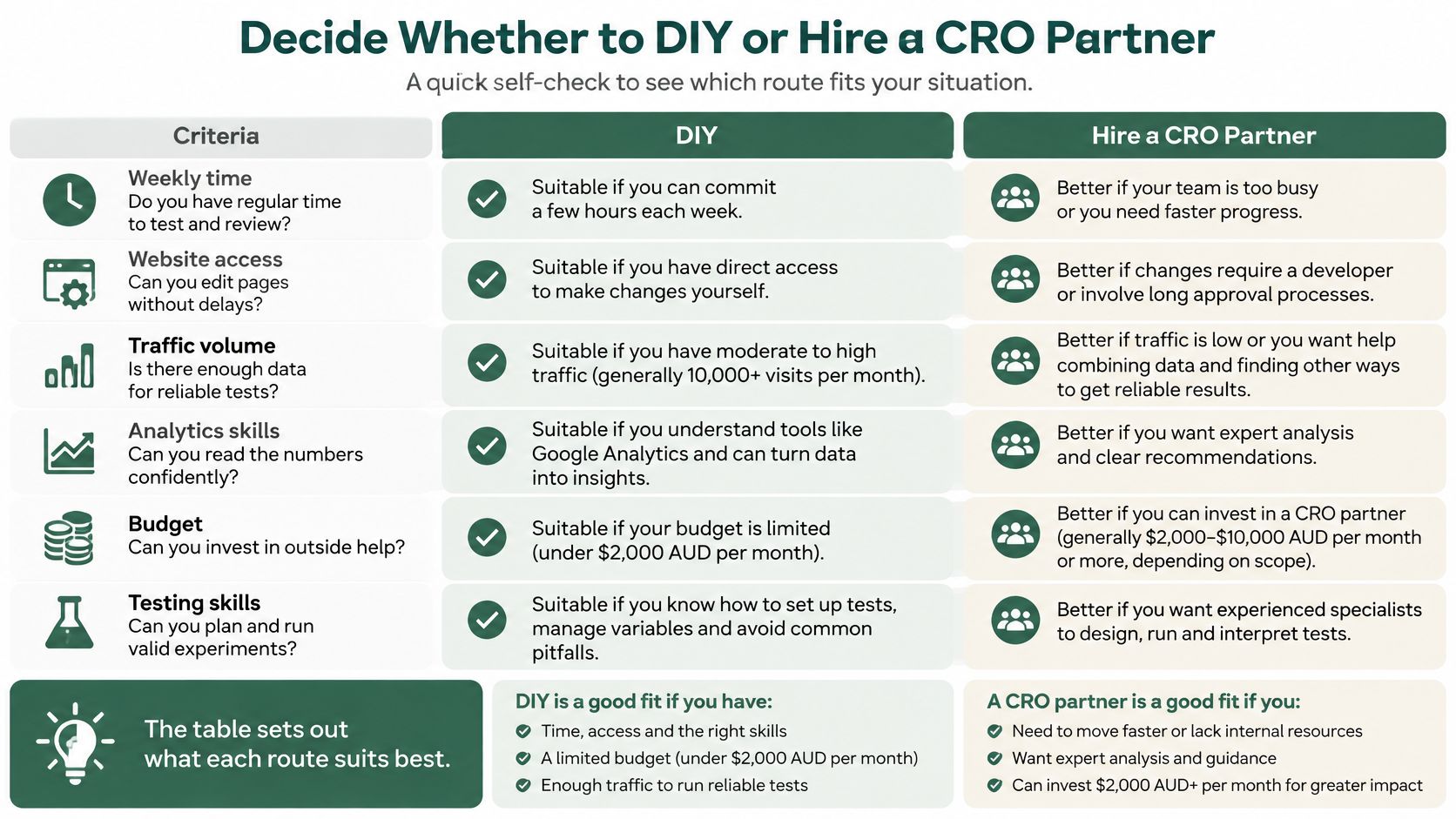
| Criterion | DIY route fits when | Hire help when |
|---|---|---|
| Weekly time | You can spare three or more hours | You have under three hours and no spare staff |
| Website access | You can edit pages and forms yourself | Changes need a developer or platform expertise |
| Traffic | Steady monthly visits you can track | Traffic is low, seasonal or inconsistent |
| Analytics skills | You can read a spreadsheet and set up goals | Tracking needs setup or repair |
| Budget | Cash is tight but time is available | You can pay a monthly fee for a clear plan |
| Testing skills | You can plan one test and log results | You want test design handled for you |
DIY suits an owner who can edit pages and run one small test a month using the steps above. Hiring suits thin or jumpy traffic, a site you can't edit, or a week with no spare hour. Both routes still need the same baseline.
One local option, and what to bring
Boocoo, a Brisbane digital agency that works with local operators, is one option if the right-hand column matches you. The first step is a free discovery call where the team learns about the business, goals, and current marketing. A strategist then maps a 90-day plan designed around industry, location, and budget. No work starts until you approve that strategy. After launch, monthly reviews and ongoing testing follow. You can also ask to be contacted by phone or email.
Before any call, gather this list so the hour isn't spent hunting logins.
- Last three months of visits and enquiries, even in a spreadsheet.
- Analytics access, or a note that tracking is broken.
- Key pages and forms, with the URLs.
- Three questions customers ask most often.
- A monthly budget range you can hold.
Run the baseline this week if the left-hand column is you. Book the discovery call if it isn't. Either way, put a date in the diary to read the numbers again.