
A Brisbane café owner opens the shop at 6 am, gets the grinder going, and serves regulars by name. By 9 am, nearby locals are already searching “coffee near me” on Google Maps. If that café doesn't appear, it's like having the lights on but the front door hidden behind a wall.
That's why learning how to add your business to Google matters so much. For most small businesses, Google Business Profile is the first thing customers see before they ever visit a website, Instagram page, or shopfront. It's free, it shows up in Search and Maps, and it can turn a quick local search into a phone call, booking, or walk-in.
For Brisbane operators, this matters even more because local competition is tight and attention is short. A plumber in The Gap, a beautician in New Farm, or a mobile dog groomer on the northside doesn't need more marketing theory. They need a listing that's set up properly, verified without drama, and kept active without eating the whole afternoon.
Getting on the Map Why Google Is Your New Front Door
A lot of small businesses still treat Google like a side task. The website feels important, social media feels urgent, and the Google listing gets left half-finished. That's backwards.
For local search, Google Business Profile works like a shop sign, receptionist, and street directory all at once. It tells people who the business is, where it operates, when it's open, what it sells, and how to get in touch. If that information is incomplete, Google has less confidence showing it, and customers have less confidence clicking it.
In Australia, businesses that fully optimise their Google Business Profile experience up to 70% more customer inquiries than unverified listings, and for Brisbane-based small businesses, completing every available field correlates with a 45% higher likelihood of appearing in the local pack according to Digital Hub Australia's guide to adding your business to Google Maps.
That local pack is the digital equivalent of getting the best table by the window.
Why this matters before anything else
A small café in New Farm might spend weeks tweaking menu posts on Instagram. A local electrician might put money into letterbox drops. Both can still lose easy enquiries if their Google profile is missing trading hours, photos, service details, or the right category.
Practical rule: If a business owner only has time for one local marketing job this week, finishing the Google Business Profile is usually the highest-leverage move.
There's also a trust factor. When someone sees a complete listing with reviews, recent photos, service details, and clear contact options, the business feels real and active. An empty profile feels abandoned, even when the business itself is excellent.
For anyone working on Brisbane Digital Marketing, this is the baseline. Before worrying about clever campaigns, it helps to understand how local visibility works. A useful starting point is this local SEO marketing overview for Brisbane businesses, which explains why Google visibility often drives the first enquiry.
A quick reality check for local operators
Small businesses don't need a perfect profile on day one. They do need a real one.
That means:
- Accurate basics: Business name, phone, website, hours, and category need to match reality.
- Clear offer: A customer should understand what the business does in seconds.
- Fresh signals: Photos, updates, and review replies show the listing is looked after.
A complete profile gives Google more to work with. It also gives customers fewer reasons to hesitate.
Your Step-by-Step Guide to Creating a Google Business Profile
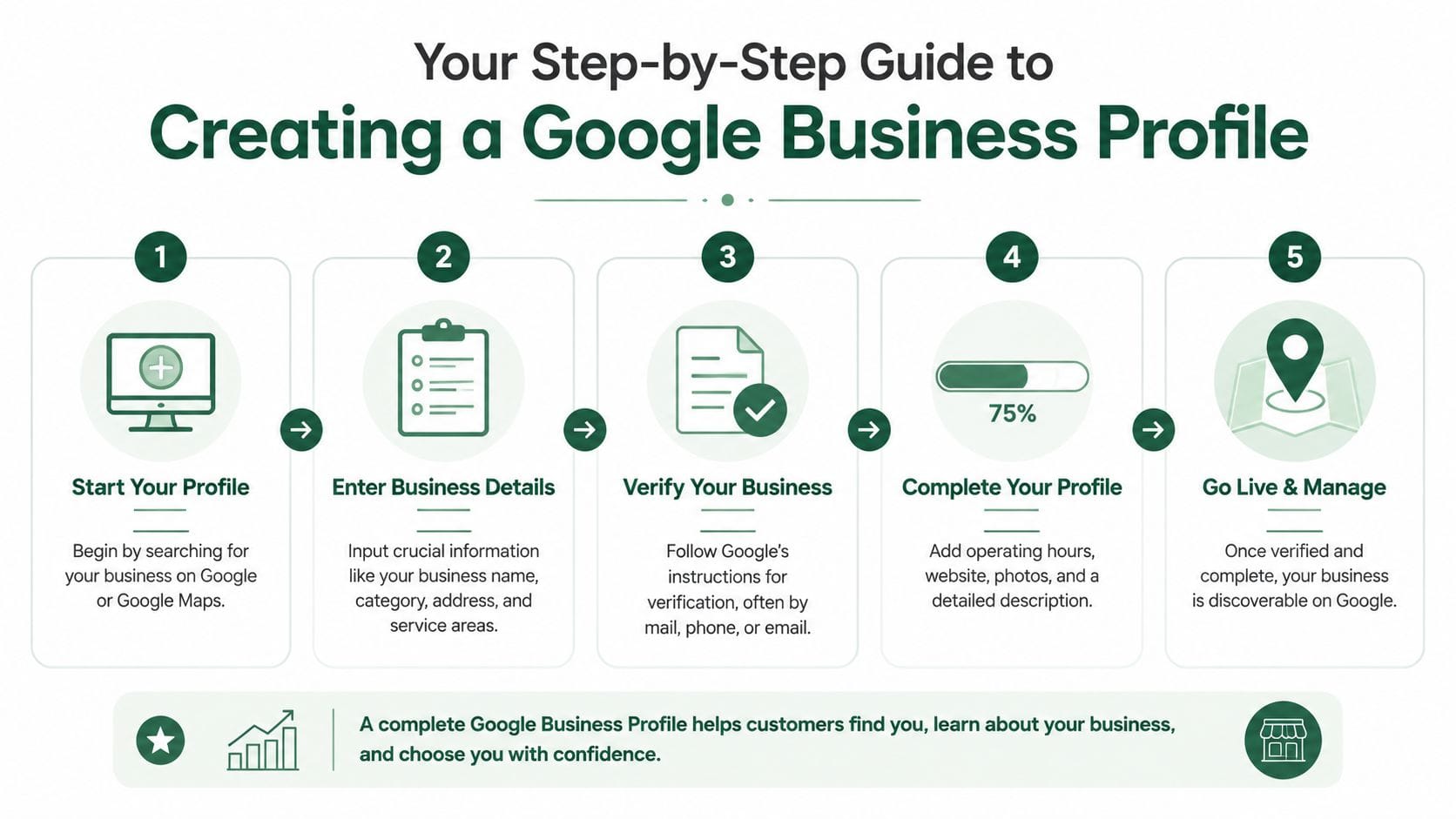
Getting set up is straightforward if the business owner makes the right choices in the right order. Most problems start when someone rushes through setup, guesses at categories, or picks the wrong business type.
Start by searching before creating anything
Before clicking “add business”, search the business name in Google Search and Google Maps. A lot of owners skip this and accidentally create a second listing. If a profile already exists, claiming it is usually cleaner than starting from scratch.
Once that check is done, head to Google Business Profile and start with your official business name. Keep it clean. Don't cram in suburb names or service keywords unless they're formally part of the business name.
A simple example:
- Good: “Northside Dog Wash”
- Risky: “Northside Dog Wash Best Mobile Dog Groomer Brisbane”
Google wants the actual business name, not an ad.
Choose the right business type early
This step trips people up more than it should. The easiest way to think about it is this. A storefront business is like a hairdresser in Paddington where customers visit the location. A service-area business is like a mobile mechanic or cleaner who travels to the customer.
For Brisbane service-area businesses, a critical step is selecting “No” for a customer-visitable location. That switches the profile into Service Area mode and helps avoid address verification failures. It matters because 34% of Australian local listings are rejected in this situation when handled incorrectly. Google still requires a precise physical address for verification, even if that address stays hidden from the public, as explained in Embark's guide to registering a business on Google.
A service-area business listing is like using a postal address for official paperwork while keeping the front gate shut to the public. Google still needs the real location for trust, but customers don't need to see it.
For trades and mobile services around Brisbane, this is one of the most important setup decisions. Choosing “Yes” when customers don't physically visit can create problems later.
Fill in the fields that actually matter
Once the profile skeleton is in place, slow down and complete the details properly. Otherwise, many listings become “technically live” but not useful.
A strong setup includes:
Primary category
Pick the closest core category, not the broadest one. A café should choose “Cafe” if that fits, not a vague alternative. A plumber should choose “Plumber”, not “Contractor” unless that's more accurate.Secondary categories
Add these if they reflect real services. A beauty salon might also include related categories if they match the offer. Don't treat categories like a wish list.Business description
Write in plain English. Say what the business does, who it helps, and where it operates. A solid description is better than a fluffy one.Services or products
Add real services customers search for. A Brisbane electrician might list switchboard upgrades, smoke alarm installation, emergency callouts, and ceiling fan installs.Hours and special hours
If the hours are wrong, the whole profile loses trust quickly.
Here's a simple comparison:
| Setup choice | What works | What doesn't |
|---|---|---|
| Business name | Real trading name | Keyword stuffing |
| Category | Specific and accurate | Broad and vague |
| Description | Clear, local, useful | Generic marketing fluff |
| Service details | Individual service lines | One catch-all phrase |
| Hours | Current and monitored | Set once and forgotten |
A website helps too, even if it's basic. If the business doesn't have one yet, this guide on building a small business website is a practical next step because the Google profile and website work best when they support each other.
A quick afternoon checklist
For a business owner doing this between jobs, these are the essentials to finish today:
- Check the name first: Search Google and Maps before creating anything new.
- Pick the right model: Storefront if customers visit. Service area if the business goes to them.
- Use a real category: Choose the service people would search for.
- Write a plain-English description: No buzzwords needed.
- Add initial photos: Exterior, interior, team, products, or completed work.
- Set hours properly: Including holiday changes when needed.
That's enough to move from invisible to credible.
Navigating the Verification Process in Brisbane
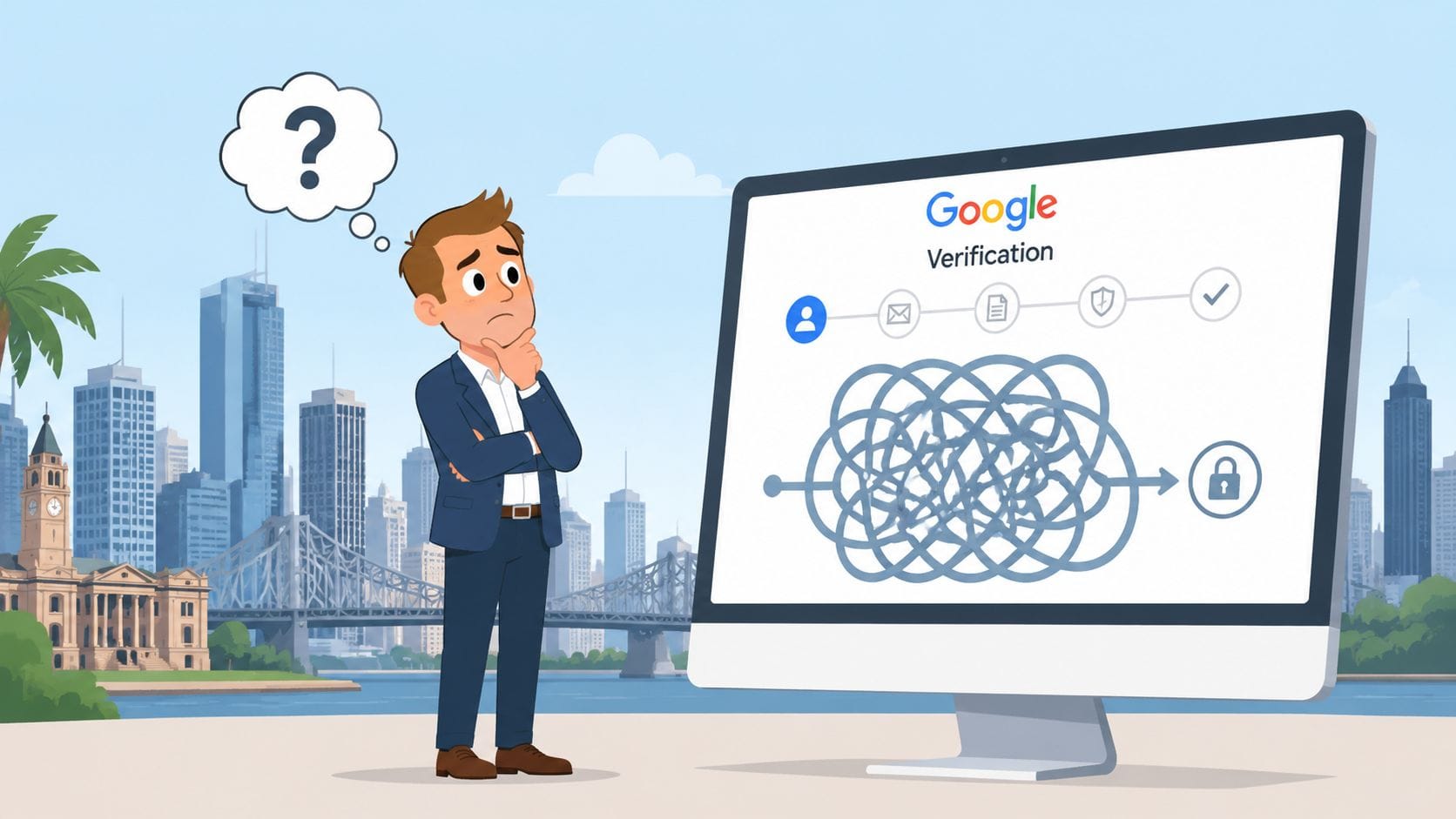
Verification is where many business owners get stuck. Setup feels easy enough, then Google asks for proof, the method changes, and the profile sits in limbo while the business owner wonders if something went wrong.
What verification usually looks like now
Google can offer different verification paths, including postcard, phone, email, or video. The tricky part is that service-area businesses in Brisbane often won't get the simple option they expected.
Recent tightening of Google's protocols means that for service-area businesses in major Australian cities like Brisbane, live video verification is often the default requirement, and verification failures for these businesses have risen by approximately 35% in the last 12 months due to stricter fraud checks, according to Listing Lock's Google Business Profile setup guide.
That's why old tutorials can feel misleading. They might mention postcard or phone verification as if every business can pick freely. Many Brisbane sole traders can't.
What to prepare for video verification
A video verification request doesn't mean the business has done anything wrong. It means Google wants stronger proof that the business is real and that the person managing it is authorised to do so.
For a mobile service business, the best approach is to prepare evidence before pressing record.
A practical checklist:
- Business tools: Show the tools, equipment, or materials used in the work.
- Branded assets: A van, trailer, uniform, signage, or printed invoice book can help show operational legitimacy.
- Physical location access: Be ready to show entry to the stated address if required.
- Business documents: Keep registration or related documents nearby if Google's process asks for them.
- Workspace context: If the business runs from home, show the business setup professionally without oversharing personal details.
The video should tell a simple story. “This business exists, operates from here, and this person manages it.”
For a café, that might mean showing the shopfront, menu area, POS setup, and access to the premises. For a plumber, it might mean the vehicle, tools, branded gear, and proof of access to the verification address.
Common mistakes that trigger delays
Some issues keep showing up:
- Using a PO Box or virtual office: Google wants a real, verifiable address.
- Mismatch between details: If the business name, website, and paperwork don't line up, trust drops.
- Rushing the video: Fast, shaky clips can make it harder for Google to confirm what it needs.
- Choosing the wrong business model: A service-area business set up as a storefront often creates avoidable friction.
For owners with more than one branch or service base, location management gets more complex fast. This guide to local SEO for multiple locations is helpful when one profile turns into several.
A calm, methodical verification usually wins. The business doesn't need to look fancy. It needs to look legitimate, consistent, and active.
Optimising Your Profile to Attract Local Customers
Once the listing is verified, the job changes. It stops being an admin task and starts becoming a marketing asset.
A good profile doesn't just exist. It gives customers enough confidence to call, click, or visit without needing five extra checks.
Over 95% of Australian businesses with a verified Google Business Profile receive at least one customer action per week, and posting at least one update weekly can increase profile engagement by 52%, according to Amplified Marketing's analysis of Google Business Profile performance.
The habits that keep a profile active
Most owners don't need a huge optimisation routine. They need a few repeatable actions that send the right signals.
Here's what tends to work best.
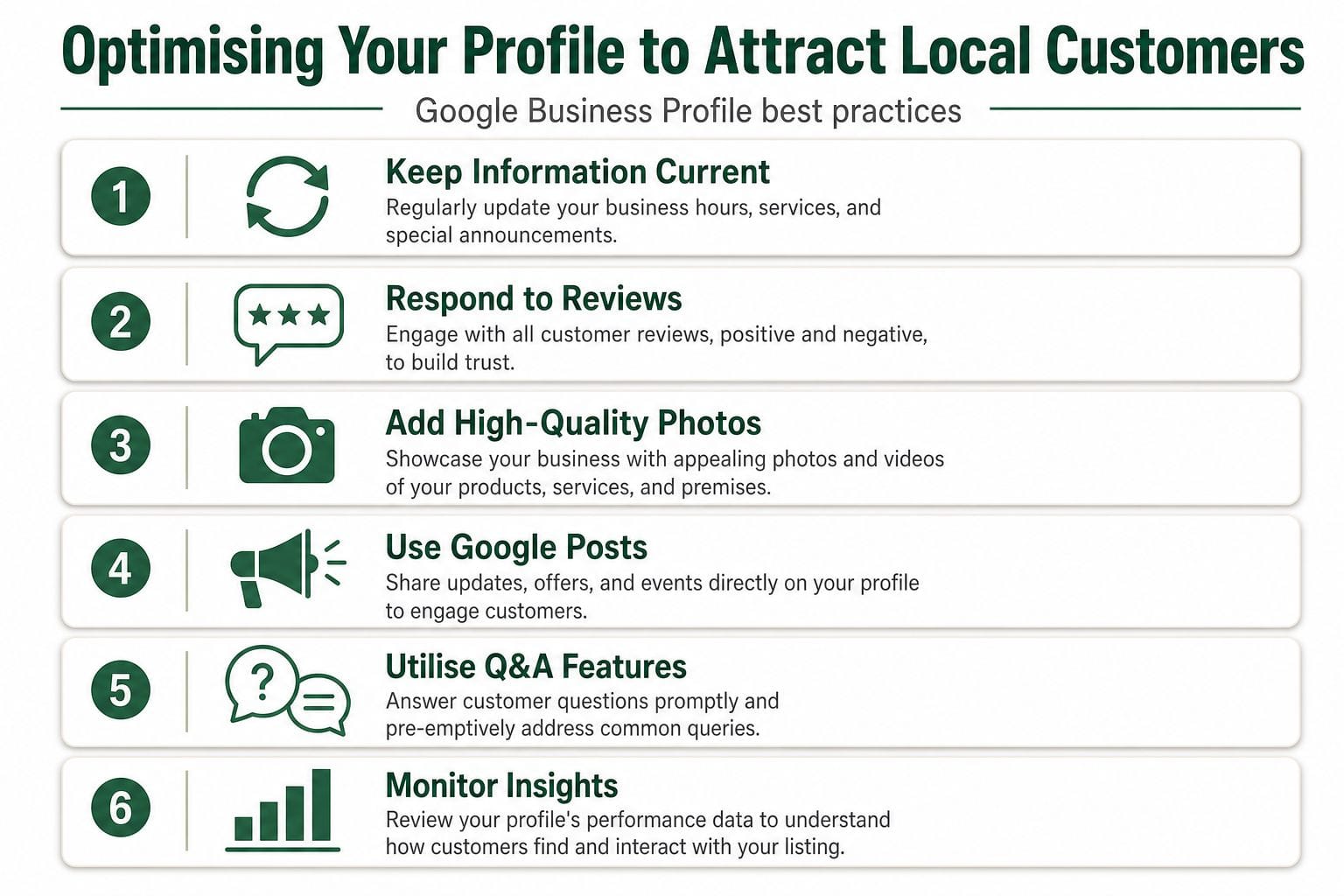
- Add real photos regularly: A café can upload fresh counter shots, new menu items, and interior photos. A trade business can add completed jobs, tools, vehicles, or before-and-after work where appropriate.
- Build out service lines: Don't leave the profile with one vague service. Spell out what the business provides.
- Post updates weekly: Share completed work, a seasonal special, a holiday trading update, or a new service announcement.
- Answer reviews promptly: Quick, thoughtful responses show the business is switched on.
- Use Q&A proactively: Add and answer common questions before customers need to ask.
A useful companion resource is this local SEO guide for small businesses, which reinforces the value of consistency across listings, reviews, and on-page details.
A simple weekly routine for time-poor owners
Many Brisbane operators don't need more tasks. They need a lighter system.
A manageable weekly routine might look like this:
| Day | Quick task | Example |
|---|---|---|
| Monday | Check hours and business info | Update public holiday trading times |
| Wednesday | Add one photo or short update | Post a completed landscaping job |
| Friday | Reply to reviews and questions | Thank a customer and answer a pricing query |
That's not a heavy lift, but it keeps the profile fresh.
Small shift, big effect: Treat the profile like a noticeboard near the front counter. If it never changes, people stop trusting it. If it's current, it feels alive.
There's another simple habit worth adopting. Respond to every review with a human answer, not a template. One Brisbane café might reply differently to a review about coffee quality than to one about quick takeaway service. One electrician might acknowledge the suburb and service completed. That context helps both trust and relevance.
According to Maven Marketing's Brisbane local SEO article, responding to every customer review within 24 hours is a strong mechanic for dominating local SEO in Brisbane in 2025.
What good optimisation looks like in practice
For a café:
- New pastry photo on Monday
- Updated weekend hours before a public holiday
- Reply to each review with a genuine note
- Q&A entry answering “Do you have gluten-free options?”
For a mobile service business:
- Add photos from completed work
- Update service areas if coverage changes
- Post a short update about a common seasonal issue
- Add services individually rather than hiding everything under one label
The best optimisation is rarely flashy. It's organised, current, and easy for a customer to trust at a glance.
Fixing Common Problems with Your Google Listing
Some profiles go live smoothly. Others develop annoying issues that don't show up until later. Duplicate listings, wrong categories, old addresses, or a sudden suspension can all chip away at visibility if nobody fixes them.
Duplicate listings and ghost profiles
This is one of the biggest traps for Brisbane service businesses. Analysis shows that 60% of new Google Business Profile setups for Brisbane service businesses result in duplicate profiles within the first month because owners create a new profile instead of finding and claiming an existing ghost listing built from old directory data, as outlined in Yellow's guide to setting up and updating a Google Business Profile.
When that happens, reviews and ranking signals get split between two versions of the same business.
The fix is usually simple in principle, even if it takes patience:
- Search first: Look for existing versions of the business in Google Maps.
- Claim before creating: If a profile exists, try to claim it.
- Suggest edits carefully: If an old listing is wrong or obsolete, use the edit process rather than launching a competing version.
- Keep records: Save screenshots and note what changes were submitted.
Wrong details and category issues
Sometimes the profile exists, but the details are off. The address may be outdated. The hours may be wrong. The primary category might describe a past version of the business, not the current one.
This often happens when outside directories feed Google older data. A café that used to open seven days might now trade six. A consultant may have changed suburbs. A cleaning business may have inherited a category that's too broad.
From a practical perspective:
| Problem | Likely cause | Best next step |
|---|---|---|
| Wrong address | Old directory data | Update GBP and align website details |
| Wrong category | Legacy listing or bad setup | Edit primary category to the closest real fit |
| Missing reviews | Duplicate profile exists | Identify and consolidate the correct listing |
| Old phone number | Historical citation data | Correct the profile and key business listings |
An inaccurate listing is like putting the right shop sign on the wrong street. Customers get confused first, then Google does.
If the business website also has outdated details, fix that too. Google trusts consistency. For businesses already juggling broader digital upkeep, this web maintenance guide for Brisbane businesses helps keep site information aligned with the profile.
If the profile gets suspended
A suspension feels dramatic, but the first move should be calm. The usual causes are policy mismatches, naming issues, address problems, duplicate activity, or suspicious edits.
Start with a short checklist:
- Review the business name: Remove any keyword stuffing.
- Confirm the address setup: Make sure the model matches how the business operates.
- Check category accuracy: Use the closest truthful category.
- Look for duplicate profiles: Remove confusion before appealing.
- Gather proof: Business documents, location evidence, and supporting screenshots help.
The fastest path isn't guessing. It's cleaning up inconsistencies, then submitting a tidy, evidence-backed reinstatement request.
Making Your Google Profile a Lead Generation Tool
A Google Business Profile shouldn't sit there like an online business card. It should work like a quiet staff member who answers basic questions, builds trust, and helps people take the next step.
That changes how small businesses should think about how to add your business to Google. The setup matters, but the key value comes from what happens after setup. A verified profile with the right business type, complete details, current photos, review replies, and regular updates can keep generating enquiries without ongoing ad spend.
For Brisbane Digital Marketing, this is one of the strongest foundations a small business can build. It supports local SEO, improves map visibility, and often brings in intent-rich leads from people already looking for a service nearby.
The practical takeaway is simple:
- set it up carefully
- verify it properly
- keep it active
- fix problems early
Once that foundation is in place, the next layer is turning those visits into leads and sales. That's where website performance, enquiry flow, and conversion tracking come in. For businesses ready to tighten that side of the funnel, this guide to conversion rate optimisation in Australia is a smart next read.