
A lot of Brisbane business owners are stuck in the same loop. They post when they remember, copy something from another account when they run out of ideas, then ignore the comments because the phone is ringing, staff are asking questions, and their primary responsibilities still need doing.
That's not a discipline problem. It's a system problem.
Social media management for beginners gets sold as a creativity game. It isn't. For a small business, it's an operations job. The businesses that stay visible aren't always the flashiest. They're the ones with a simple plan, a repeatable workflow, and realistic expectations about time.
Why Social Media Still Matters for Brisbane Businesses
A Brisbane café owner in New Farm, a plumber covering the western suburbs, and a consultant working from a home office in Paddington all face the same problem. Customers check social channels before they trust the business. They look at recent posts, reviews, photos, replies, and whether the business feels active or abandoned.
That matters because social media in Australia isn't a side channel anymore. According to DataReportal figures referenced in this Australian social media summary, Australia had 20.9 million social media user identities at the start of 2025, equal to about 79.4% of the population, and Australians aged 16+ spent an average of 1 hour 51 minutes per day on social media. The same summary also notes 26.1 million internet users and 97.1% internet penetration. For a beginner, that means the audience is already there. The issue isn't whether social matters. The issue is whether the business shows up properly.
A local business doesn't need to “go viral” to benefit. It needs to be easy to find, easy to understand, and active enough that a customer feels comfortable making contact. That's a much more achievable job.
Practical rule: treat social like a front counter. If it looks unattended, people hesitate.
For Brisbane operators, the win is often simple. A clean Facebook page for local enquiries. An Instagram profile that shows recent work. A LinkedIn presence that makes a professional service look credible. None of that is glamorous. All of it helps.
Beginners often overcomplicate this part. They think social media management for beginners means learning every trend, every app, and every content format at once. It doesn't. It means building a reliable presence in a mainstream attention market.
For business owners who want a broader local perspective, this guide on local social media efforts is a useful companion read because it keeps the focus on practical local visibility rather than generic online advice.
Building Your Simple Social Media Strategy
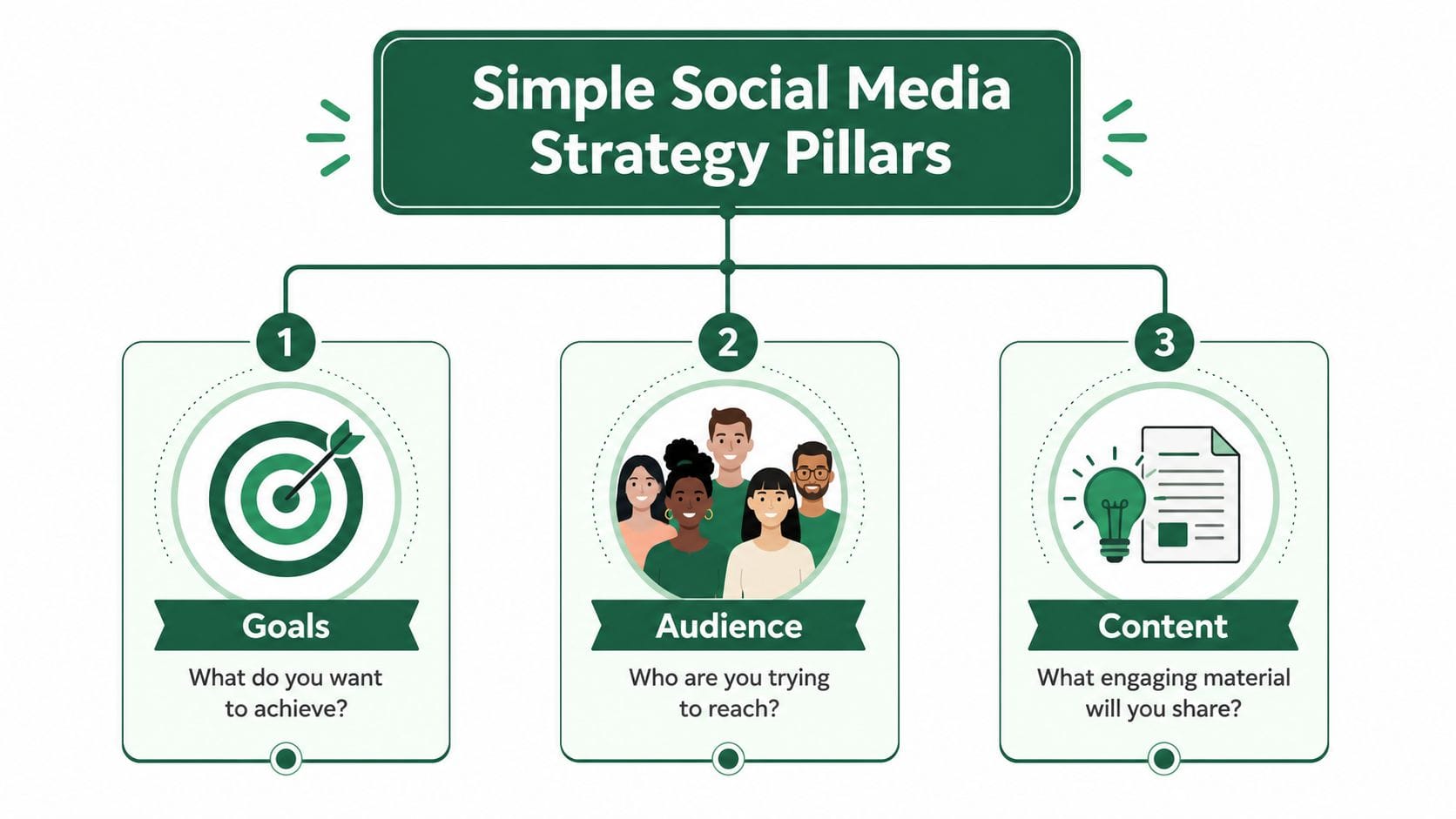
Most small businesses don't need a giant strategy document. They need one page that answers three questions clearly. What does the business want from social media, who needs to see it, and what should the posts say consistently?
That's the starting point.
A beginner-friendly workflow should begin with an audit, then a review of recent performance, then a small number of SMART goals tied to business outcomes, as outlined in Sprout Social's strategy guidance. That order matters. Goals set before the audit are usually guesses.
Start with what already exists
Open every active account and check the basics.
- Profile accuracy: business name, phone number, email, website, location, service area.
- Brand consistency: same logo, similar colours, same offer, same tone.
- Recent activity: whether the page looks current or forgotten.
- Top-performing posts: what got replies, shares, saves, messages, or clicks.
- Dead weight: old accounts that no longer match the brand or get no attention.
Then look back over the last 90 days. Don't obsess over every metric. Just note what types of posts got action and what got ignored.
A Brisbane physio might notice that treatment-room photos did very little, while short educational tips answered common client questions and sparked bookings. A mobile dog groomer might find before-and-after shots consistently work better than generic pet memes. Those patterns are the beginning of strategy.
Set goals that connect to the business
The wrong goal is “post more”. That's activity, not a result.
The right goals usually sound like this:
- Get more enquiries through Facebook messages or Instagram DMs.
- Drive more website visits to a service page or booking form.
- Build stronger local credibility by showing recent jobs, customer feedback, and team expertise.
Keep it tight. One to three goals is enough. More than that and the business starts chasing too many outcomes at once.
Social media should support the sales process, not become a hobby with a logo on it.
If a business owner wants help shaping this into a document, this social media strategy template is a handy starting point because it forces decisions instead of leaving everything vague.
Know who the posts are for
“Audience” doesn't mean everyone in Brisbane. It means the buyer the business most wants more of.
A useful shortcut is to write a short customer snapshot:
- what they need,
- what problem they're trying to solve,
- what might stop them from contacting the business,
- what proof would make them trust it.
A family lawyer will speak differently from a car detailer. A B2B IT provider should sound different from a suburban bakery. That sounds obvious, but plenty of pages still post as if all customers think the same way.
For businesses that haven't done this before, a simple user persona guide helps turn a fuzzy audience into someone the content can speak to.
Choosing Where to Play in the Brisbane Market
Trying to post everywhere is one of the fastest ways to burn out. It also makes the business look average on every platform instead of strong on one or two.
That's why beginners need to decide where to stop, not just where to start. Hootsuite's content guidance pushes the same idea. Content should match platform behaviour, and quality should beat quantity.
Pick the platform that matches buying behaviour
A Brisbane tradie usually doesn't need TikTok first. A boutique fashion label probably doesn't need LinkedIn first. A local accountant might get better value from Facebook and LinkedIn than from chasing Instagram Reels every week.
The better question is this. Where does the customer check credibility, ask questions, or compare providers?
Some examples make it easier:
- A plumber in Indooroopilly or Chapel Hill: Facebook often works as the practical trust layer. Locals ask for recommendations there, and recent job photos, reviews, and service updates help.
- A beauty clinic in West End: Instagram makes more sense because the service is visual, personal, and style-led.
- A commercial broker or HR consultant in the CBD: LinkedIn is usually the stronger fit because buyers want expertise, authority, and professional proof.
- A product-based business with strong visual appeal: Instagram can carry the core load, with Facebook supporting community and enquiries.
Which Social Media Platform for Your Brisbane Business
| Platform | Best For... | Brisbane Example |
|---|---|---|
| Local service businesses, community trust, enquiries, reviews, updates | A northside electrician sharing recent jobs, service areas, and customer feedback | |
| Visual brands, hospitality, beauty, retail, design-led services | A Fortitude Valley boutique showing new arrivals, styling clips, and behind-the-scenes content | |
| B2B services, consultants, professional credibility, recruitment | A Brisbane financial adviser posting market commentary and practical client education | |
| TikTok | High-energy visual content, personality-led brands, education with entertainment | A local meal prep brand using quick recipe videos and founder-led clips |
The point isn't that one platform is best overall. The point is that each one rewards a different style of communication.
A simple rule for beginners
Start with one primary platform and add a second only if the team can keep both active without chaos.
That usually means:
- Primary platform: where the business is most likely to get attention from ideal customers.
- Secondary platform: where content can be repurposed with minimal extra effort.
A good combination for many Brisbane small businesses is Facebook plus Instagram. A good combination for many service firms is LinkedIn plus either Facebook or Instagram, depending on the offer.
What should be avoided is opening accounts on every platform because someone said that's what modern marketing looks like. It isn't modern. It's scattered.
Your Time-Saving Content and Scheduling System
The biggest beginner mistake isn't weak captions. It's running social media with no workflow.
That's where most business owners lose patience. Posting feels manageable for a week, then client work piles up, the phone keeps ringing, and social disappears until someone notices the last post was ages ago.
Guidance from UCSB's social media best practices is useful here because it focuses on resources, approvals, and workflow before posting. That's the part beginner advice often skips, and it's the part that keeps social sustainable.
Build content pillars once
Content pillars stop the weekly “what should be posted today?” panic. They're just repeatable themes.
For a Brisbane small business, four pillars are plenty. Examples:
- Project or job spotlights: before-and-after work, completed installs, fresh stock, finished client jobs.
- Helpful advice: common questions, myths, checklists, maintenance tips, quick how-tos.
- People and process: team introductions, behind-the-scenes clips, workspace moments, how the service works.
- Proof: testimonials, reviews, repeat customers, FAQs that remove hesitation.
A builder might rotate through project updates, renovation tips, team snippets, and client feedback. A suburban café might use menu highlights, staff moments, local community posts, and customer favourites.
A simple system beats a clever one that nobody has time to maintain.
Use a weekly batch process
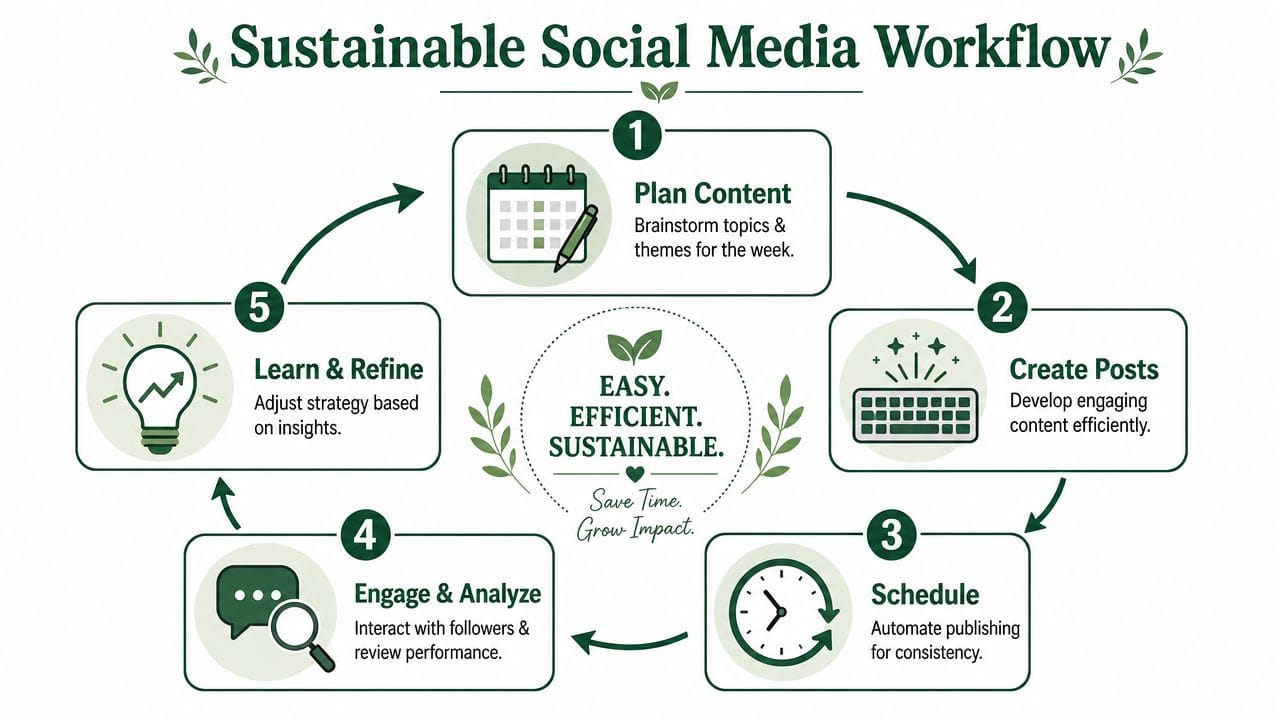
A time-poor owner needs one contained block each week, not constant interruption. A workable model is a single planning and scheduling session using Meta Business Suite for Facebook and Instagram, or another scheduling tool if LinkedIn is part of the mix.
A practical routine looks like this:
- Review last week quickly. Check which post got comments, messages, clicks, or saves.
- Choose this week's topics. Pull one idea from each content pillar.
- Create in batches. Write captions together. Take or select visuals together.
- Schedule everything. Load posts into the calendar in one sitting.
- Leave room for live moments. One spontaneous post is fine. The system should still run without it.
That turns social media management for beginners into a recurring admin task instead of a daily stress point.
Businesses that rely heavily on Facebook may also want to review posting patterns using this guide to the best time to post to Facebook. Timing won't rescue weak content, but it can help good posts get seen.
Keep the calendar boring and workable
A content calendar doesn't need to be fancy. A spreadsheet is enough.
Include:
- Date
- Platform
- Post topic
- Visual needed
- Caption draft
- Call to action
- Status such as draft, scheduled, or posted
The best calendar is the one the team will use. Colour-coded tabs and complex approval chains are overkill for most sole traders.
A simple weekly rhythm could look like this:
- Monday: helpful tip
- Wednesday: behind the scenes or team post
- Friday: proof post, customer result, or featured job
That rhythm is easy to repeat, easy to delegate later, and easy to improve once the business sees what gets traction.
Engaging Your Community and Measuring What Matters
Posting isn't the whole job. Social works better when the business acts like a participant, not a billboard.
That means replying to comments, answering messages, thanking customers for tagged posts, and asking questions that invite real answers. Nothing complicated. Just normal human interaction.

Stop posting like a flyer drop
A lot of beginner content sounds like an ad every time. Offer, discount, offer, reminder, offer again. That gets ignored fast.
A better approach is to start conversations with simple prompts:
- ask customers which option they'd choose,
- run a poll in Stories,
- answer a common question in a short video,
- share a customer photo with permission,
- post a quick opinion on something relevant to the local industry.
A Brisbane gym, for example, could ask followers which class time suits them best. A garden designer could post two design styles and ask which suits a Queensland backyard better. A café could ask what pastry should return next week.
Those aren't gimmicks. They're easy ways to create feedback and signal that the business is paying attention.
What to measure without getting lost
Most owners don't need a giant reporting dashboard. They need a few numbers that help them decide what to do next.
The useful checks are usually:
- Reach: did enough people see the post?
- Engagement: did anyone react, comment, save, share, or reply?
- Action: did someone click, message, book, or enquire?
That's enough to spot patterns. If educational posts consistently drive messages, do more of them. If polished graphics get seen but nobody clicks, they may look nice without helping the business.
If a post gets likes but no enquiries, it may be entertainment, not marketing.
Use a simple content mix
Expert guidance from the American Marketing Association's strategy article recommends filling out all profile fields, using searchable keywords, keeping branding consistent, and using a content mix such as the 70-20-10 rule to avoid overly promotional feeds.
For a small business, that can be interpreted plainly:
- Most posts should help, inform, or entertain.
- Some posts should build trust through proof or community.
- A small share should sell directly.
That same guidance around complete profiles and consistent branding matters more than most beginners think. If one channel has an old logo, another has a half-written bio, and a third has no clear service description, trust drops before the customer even reads a post.
Knowing When to Get Help and Your Next Steps
DIY is fine at the start. It's often the right move. But there's a point where doing everything personally starts costing more than it saves.
That point usually shows up when the owner knows what should happen but can't keep it consistent. The strategy exists. The intention is there. The time isn't.
When DIY stops making sense
A business should think seriously about outside help if these signs show up regularly:
- Social is stealing time from core work: quotes, service delivery, client follow-up, or sales are slipping.
- Posting is inconsistent: the page goes quiet for long stretches, then bursts back to life randomly.
- Enquiries have plateaued: the business is active enough to know the basics, but results aren't improving.
- There's no system: content depends on spare moments and memory.
- The owner dreads it: that usually means the workload no longer fits the role.
Outsourcing isn't a failure. It's often the first sensible operational decision after a business hits capacity.
What the next move should look like
The right support shouldn't add more confusion. It should remove friction. A good partner helps choose the right channels, organise the workflow, keep content moving, and report on what matters.
For Brisbane businesses that want a local, practical option, this overview of a Brisbane marketing consultant gives a good sense of what outsourced support can look like when the goal is clarity rather than hype.
The main thing is this. Social media management for beginners doesn't need to feel endless. Keep the strategy simple. Pick fewer platforms. Build repeatable content pillars. Batch the work. Measure the actions that lead somewhere.
That's how social becomes manageable. That's also how it starts pulling its weight as a real business function.