

A wet Tuesday in Brisbane, a plumber is still on the ladder after a burst-pipe callout. The phone buzzes. A homeowner in Chermside has opened three sites in a row and will ring the first one that says, in plain words, who turns up, which suburbs are covered, and how to book. Ten seconds. That is the whole decision.
Most small business sites fail that test. The home page lists every service, the price sits in a footer, and the button says Submit. Useful copy for websites does the opposite. Each page gets one job, one proof point and one next step. The score is enquiries and booked jobs, not word count or how often a phrase appears.
Brisbane Digital Marketing for a sole trader is mostly this kind of tidy writing, done in spare hours, not a big campaign. The pages below show how to build that structure, gather customer words for free, write headlines that earn a call, label pages for search without stuffing, and count the jobs that follow.
The Page Blueprint Every Brisbane Website Needs
Think of the home page as a shopfront window on Queen Street. Passers-by should see what is inside before they cross the road. A website works the same way. If the first screen does not name the trade, the suburbs and the next step, the reader is already gone.
Mobile is the default, not a nice extra. The Australian Communications and Media Authority reported that 95% of Australian adults used a mobile phone to go online in 2024, and 92% went online through their mobile several times a day. People check a site between jobs, in the car park, or while a kettle boils. The first screen has to work in that short, repeated visit.
The blueprint is simple enough to finish on a Sunday afternoon.
- One job. A page answers one search and one buying question. A hot-water page does not also sell bathroom renovations.
- One proof point. A licence number, a written quote time, a review line, or years working in Brisbane. One checkable fact beats a stack of adjectives.
- One next step. Call, request a quote, or book. Not three buttons fighting each other.
What each page must say
The home page names the service, the suburbs and the phone number inside the first screen. A service page answers who the work suits, what is included, the pricing method and a typical timeframe. An about page proves there is a real person, with an owner story, licences, years in Brisbane and the service area. A landing page matches one ad to one offer, with two proof points, a short form and a single action.
| Page | Main job | Must-have copy | Call to action |
|---|---|---|---|
| Home | Say what you do and where in the first screen | Service list, suburbs served, phone number | Call now or request a quote |
| Service page | Answer one search and one buying question | Who it suits, what is included, pricing method, timeframe | Book a call or request a quote |
| About page | Build trust with the person behind the business | Owner story, licences, years in Brisbane, service area | Start a conversation |
| Landing page | Match one ad or campaign and win one action | Offer, single benefit, two proof points, short form | Submit the form |
Practical rule: If a line does not help the page's one job, cut it. A northside electrician does not need a paragraph about "passion for excellence" above the phone number.
Plain words matter on a small screen. Short sentences, everyday labels and a button a thumb can hit save more enquiries than a clever slogan. The accessible writing tips from Lumi Humanizer are a useful checklist when headings, buttons and form labels start to drift into jargon. Pair that with solid web design best practices so the words and the layout do the same job.
A Chermside plumber's first screen might read: "Same-day blocked drains across Brisbane's northside. Quotes in writing before any work starts. Call now." Service, place, proof, action. Nothing else belongs above that.
How to Research Your Customers in One Afternoon
Customers already use the words a page needs. Those words sit in the inbox, the phone log and a handful of reviews. Paying for a survey is optional. An afternoon with what is already on hand is not.
There is a wider trust problem worth keeping in mind while reading those notes. Ecommerce News Australia reported that more than 72% of Australian businesses surveyed believed they had a strong digital profile, while only 49% of consumers agreed. A thin review list does not block a good page. Unsupported claims do. "Brisbane's leading" and "best quality" fail a stranger. Qualifications, service-area boundaries, realistic timeframes, guarantees and honest limits, such as a minimum job size, cost nothing and show the business is real.
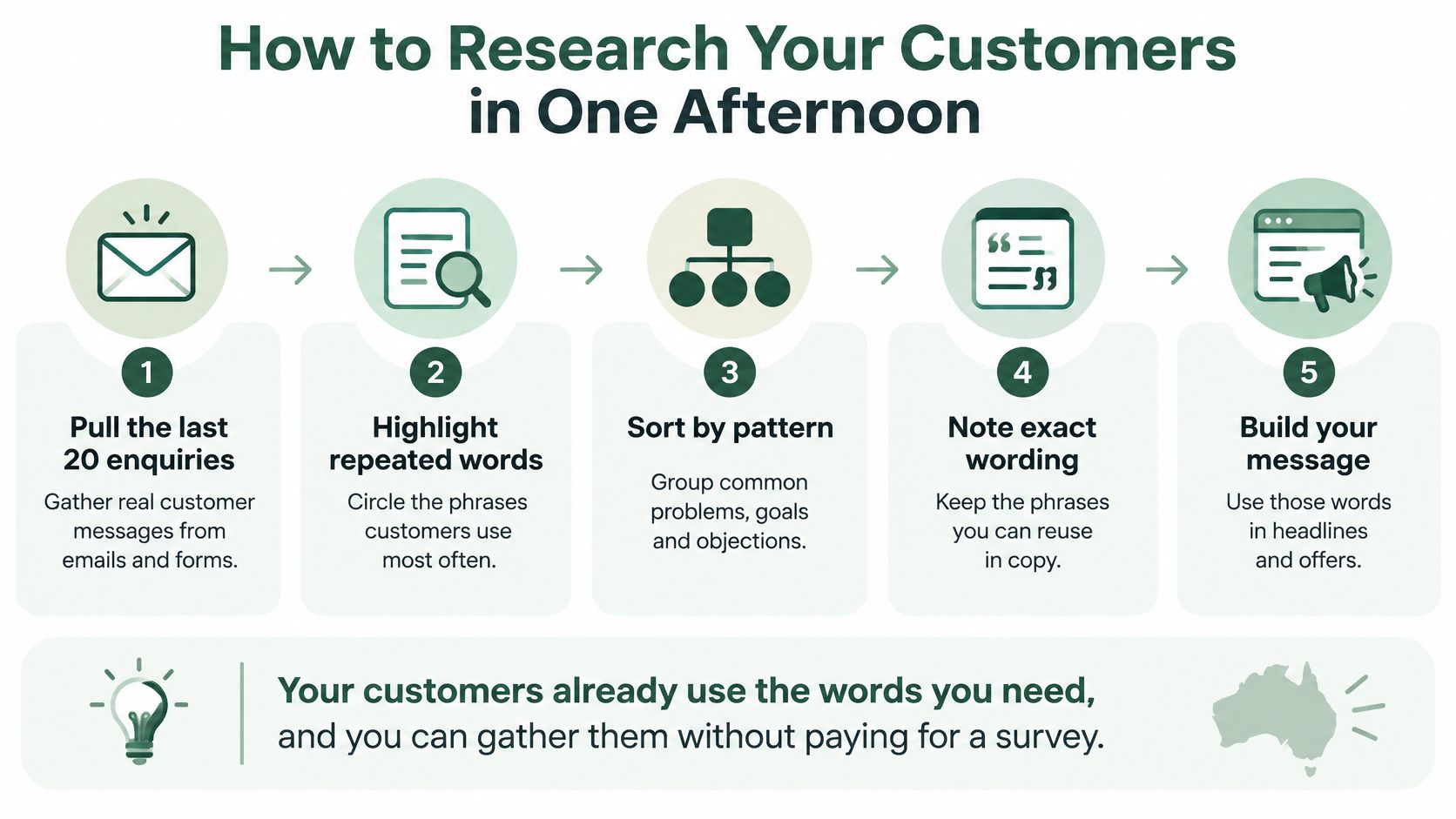
A five-step afternoon
- Pull the last 20 enquiries. Open the inbox, the phone log and recent quote forms. Copy the exact questions people asked, not a tidied version. The slip is rewriting "when is my BAS due?" into "compliance support" before the pattern is clear.
- Read five to ten reviews. Cover the business and two competitors. Note praise words and complaints separately. The slip is only collecting compliments and missing the objection that keeps coming up.
- Ask three recent customers. One question on why they chose the business, one on what nearly stopped them. A text message is enough. The slip is turning the chat into a sales call.
- Build a one-page messaging map. Main problem, outcome, three proof points, two objections and the answer to each. A user persona can sit beside that page later. The slip is making the map longer than one page, which means it will not get used.
- Check every claim. Swap "quality service" for something a reader can verify, such as "quotes in writing within 48 hours". The slip is keeping a claim because it sounds professional when nobody can check it.
Free sources beat a paid tool at this stage. Google Search Console shows the queries that already bring visitors. The phone log shows the questions those visitors still needed to ask.
Say a Sunnybank bookkeeper finds that most enquiries ask about BAS deadlines. The service page should put that answer in the first paragraph, not halfway down under a heading about "customized solutions". The stranger test is simple. Can someone who has never met the owner tell who the page is for from the first 100 words? If not, the map is not finished.
Headlines and Calls to Action That Earn Enquiries
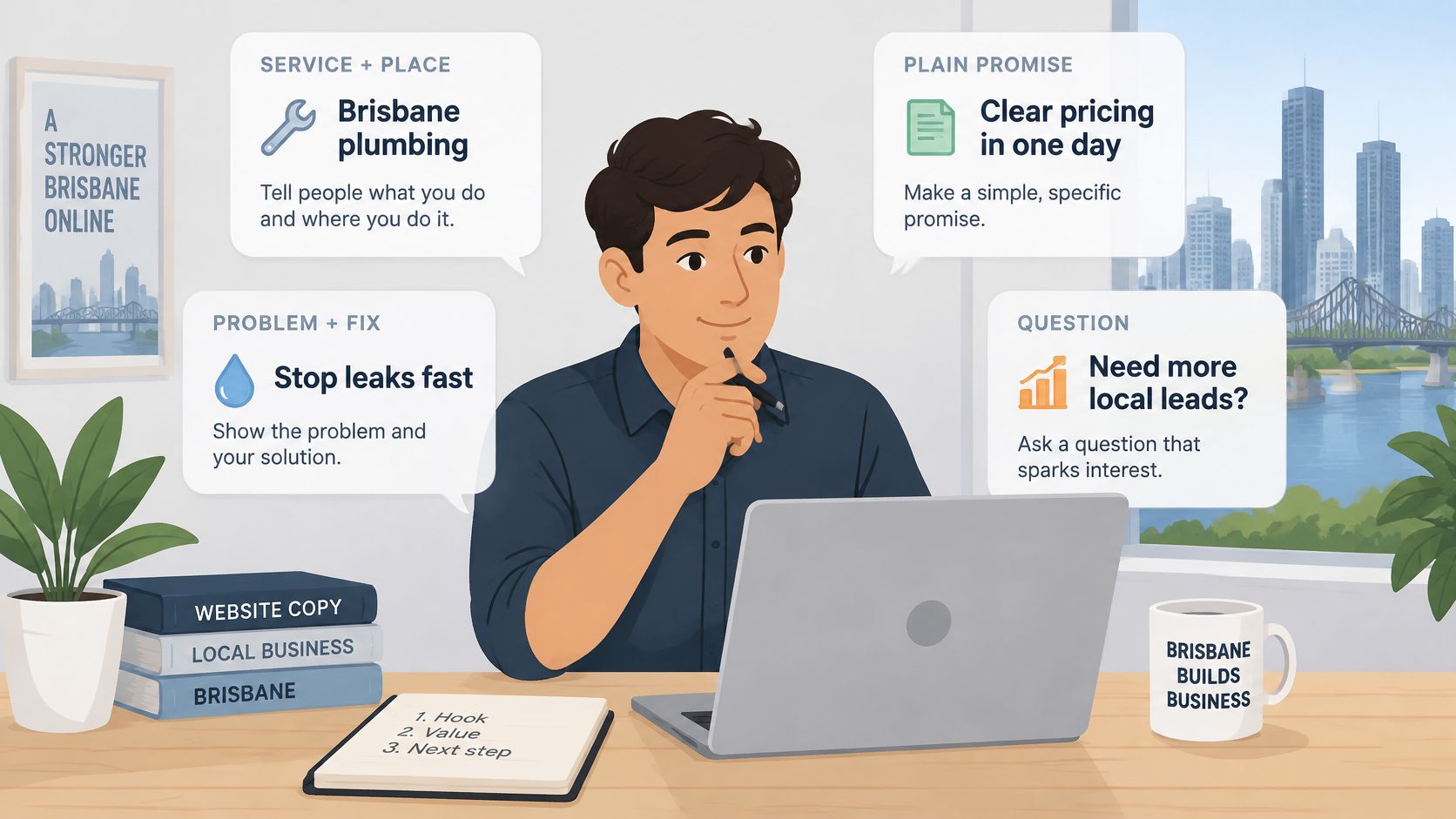
A homeowner searching for a plumber in Chermside needs to know quickly whether the business handles their job and where to take the next step. “Quality plumbing solutions for all your needs” answers neither question. Give the headline one job: make the right visitor want to read the next line.
| Formula | Pattern | Brisbane example |
|---|---|---|
| Service plus place | [Service] in [suburb or area] | Same-day plumbing repairs in Chermside |
| Problem and fix | Stop [problem]. [Outcome] in [timeframe] | Stop blocked drains. Cleared in Chermside, usually the same day |
| Plain promise | [What you do] for [who it suits] | Bookkeeping for Brisbane sole traders |
| Question | Need [outcome] in [place]? | Need a bathroom renovation in Ashgrove? |
Choose the formula to match the page's job. Service plus place can orient visitors on a home page. Problem and fix suits a service page for someone with a specific issue. A plain promise names the client type for a professional service. A question can connect an ad to a landing page.
Buttons and forms that finish the job
Use a verb on the button: Request a quote, Book a call, or Check availability. Put the main action near the top of the page, then repeat it after a proof point. Replace “Submit” with wording that explains what happens next, such as “Get my quote within 24 hours”, only if the business can meet that timeframe. These persuasive writing techniques help make the next step clear.
Ask for details needed to respond, such as name, phone, suburb and job type. Extra fields take time to complete, so ask only for information the reply requires. Add a short privacy line explaining how the details will be used, and keep any newsletter opt-in separate and optional.
The Australian Privacy Principles cover many, but not all, small businesses. Check the Office of the Australian Information Commissioner's guidance on who the Privacy Act covers. If your business handles personal information, make sure the form's privacy wording matches how you use it.
Give each page one job, one proof point and one next step. Check that the headline, supporting copy and button all agree. A promise in the button only earns trust when the page explains what the visitor can expect.
On-Page SEO Copy Without the Keyword Stuffing
A page for a Chermside plumber should make the service and location clear, then help the reader decide what to do. Search engines can interpret natural language. Repeating “plumber Brisbane plumber cheap” makes the page harder to read without giving it a clear job.
Set up the page labels in order:
- Page title. Name the service, suburb and business. “Blocked drains in Chermside | Northside Plumbing” is clear.
- One H1. Use a natural version of the customer's search, such as “Blocked drain repairs in Chermside”.
- H2 subheadings. Phrase them around real customer questions, such as “How much does a hot water repair cost in Brisbane?”
- Body copy. Use the words customers use. If they say “blocked drain”, lead with that rather than “drainage remediation”.
- Image alt text. Describe what the image shows and why it is relevant. “Technician clearing a blocked drain in a Chermside kitchen” is more useful than “Image 3”.
- Meta description. Summarise the page's offer and give the reader a reason to visit. This guide to writing a useful meta description explains how to keep it clear and relevant.
Local labels and readable pages
List the suburbs you serve on the relevant service page. Create a separate page for an area only when you can add useful local detail, such as typical jobs, access considerations or a relevant example. Pages that differ only by suburb name give readers little help and can compete with one another in search.
Keep the business name, address and phone number consistent across your website, Google Business Profile and directories. That gives customers a reliable way to recognise and contact you. Once those details match, you can work to improve your Google Maps visibility.
Accessibility helps people use the page, including readers with disabilities. An Adobe report on digital accessibility.pdf) reports that 29% of Australians with disabilities struggle to use the internet because of poor web accessibility. Use headings in order, keep paragraphs short and make link text describe its destination, such as “see our bathroom renovation pricing”. WCAG 2.1 provides guidance for accessible web content. Put the direct answer near the start of each section so readers can find it quickly.
A Chermside plumber could replace “plumber Chermside cheap plumbing” with “Blocked drains cleared in Chermside, usually the same day”. The service and location remain clear, while the sentence tells a potential customer what to expect.
Test Your Copy and Count the Enquiries
Clicks are a weak score. A page can attract more visits and still book fewer jobs. The useful loop is short. Record a baseline for two to four weeks, change one thing, run it long enough to see a pattern, then decide. Five visitors do not decide a headline.
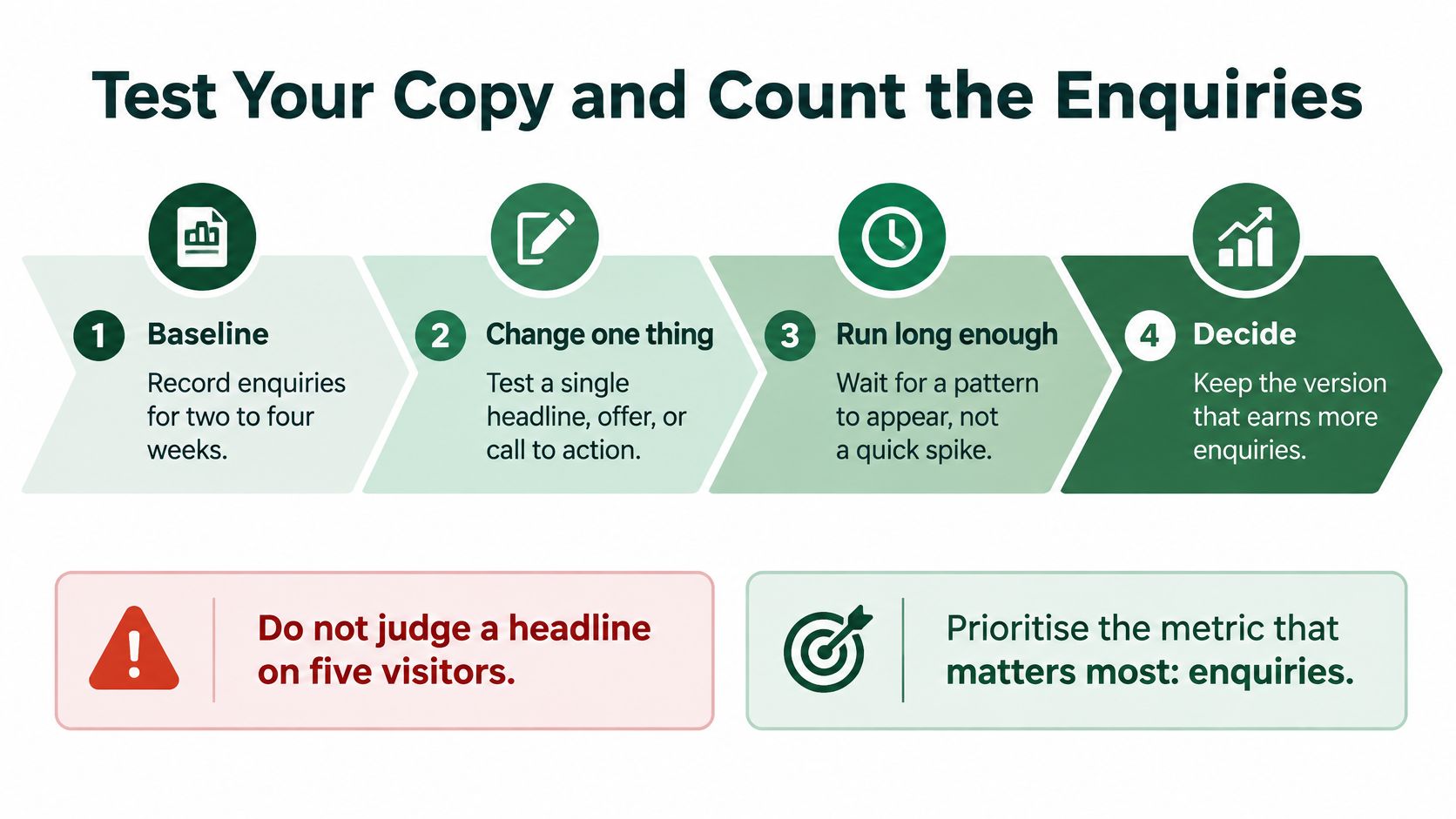
What to change first
Test in this order: the headline on the busiest page, the wording of the main button, the length of the form, then whether reviews sit above or below the fold. One change at a time. Two changes at once make it impossible to know which line did the work.
Split the numbers by device, suburb and traffic source. A headline can win on mobile from Brisbane North and lose on desktop from a paid ad. A single blended figure hides that split. For a plain definition of the rate itself, see what a conversion rate is.
Follow the path, not a single number. Visits, then calls or form starts, then completed enquiries, then jobs won. The biggest drop is the place to rewrite. More clicks with fewer quotes means the page is the weaker one, even if the graph looks healthier.
| Metric | Where to find it | Change the copy when |
|---|---|---|
| Enquiry rate | Form submissions divided by visits | It falls below your baseline for two weeks |
| Button click-through | Clicks on the main call to action in analytics | Few visitors click the button |
| Form completion | Form starts compared with submissions | Many people start the form but few finish |
| Calls from the website | Call tracking number or phone log | Calls are rare despite steady visits |
A free analytics account and a call log in a spreadsheet are enough to start. Any benchmark is a starting point, not a promise of results.
If form starts are high and finishes are low, shorten the form before rewriting the headline. If visits are steady and calls are rare, the phone number is probably too far down the page. Match the fix to the drop.
Fix Five Copy Mistakes and Rewrite Your Homepage This Week
Five mistakes show up on local sites again and again. Each one has a fix that fits a spare evening.
A menu or price list trapped in a PDF. A Ferny Grove café's menu that will not load on a phone is invisible at the table. Rewrite it as text, with allergy notes beside each item. People can search it, and a screen reader can read it.
Text blocks longer than five lines on a phone. Shorten them. Use bullets for lists of inclusions, suburbs or steps. A wall of text gets skipped between jobs.
The pricing method buried in the footer. Move it into the first screen in plain words. "Call-out fee quoted before we leave the depot" is clearer than a link labelled Pricing that opens a PDF.
Jargon such as "complete solutions". Swap in the words customers already used. If they said "BAS deadline", the page should say that. Trade owners rewriting a first screen can also look at writing homepage copy for local trades for a second set of examples.
An about page with no next step. Add a short contact prompt partway down, not only at the bottom. Trust without an action is a dead end.
Three weeks, one page at a time
Week one is the homepage first screen only. Use the blueprint and one headline formula. Leave the rest of the site alone.
Week two is the main service page, written from the messaging map. Who it suits, what is included, how pricing works, and a realistic timeframe.
Week three is one measurement from the table above. Enquiry rate is the best default if only one number will be watched.
At the end of each week, run five questions. Does the first screen name the service? Is the suburb stated? Is there one clear next step? Is a proof point visible? Could a stranger tell who this is for?
If the site is slow or painful to edit, a platform change may be the first fix rather than another rewrite. Boocoo is one option, not a requirement. It is a Brisbane digital agency that has been helping small and medium businesses grow online for over 15 years, and it builds fast, conversion-focused WordPress websites that look good on every device. A low-pressure chat about goals is available on 1300 093 797 or at hello@boocoo.au.