
A Brisbane owner can start Tuesday with enquiry emails on a phone, job leads in a notebook, past customers in a spreadsheet and quote requests buried in text messages. By lunchtime, a promising lead may still be waiting for a reply, while a repeat customer has contacted the business twice because nobody can see who last handled the job.
That isn't a software problem alone. It's a workflow problem. Customer relationship management gives a small business one organised place for leads, conversations, quotes, follow-up tasks and customer history. For owners searching for Brisbane Digital Marketing support, CRM should sit beside SEO, advertising and website conversion work, because marketing only creates value when the business responds properly to the enquiries it generates.
When Customer Details Live in Too Many Places
A local electrician receives a website enquiry while driving between jobs. The customer's name and phone number remain in the inbox. The quote notes go into a notebook. A follow-up reminder sits in the owner's memory, and the customer's previous switchboard repair is recorded in an old spreadsheet.
That arrangement works until the business becomes busy. Then a quote gets sent twice, a missed call receives no reply, or a returning customer has to explain the same problem again. Brisbane operators compete in a market where customers can contact several nearby providers quickly, so a slow or uncertain response makes the business look less organised than it really is.
A clear lead follow-up process starts by putting every new enquiry into a shared record before the first reply. The record should show the customer's contact details, service requested, source of the enquiry, conversation history, quote status and next action.
Practical rule: If a customer interaction matters, it belongs in the shared system, not in one person's memory.
CRM should remove decisions, not create more
A useful CRM is the business equivalent of a tidy reception desk. Every visitor gets a record, every request gets a next step, and every staff member can see what has already happened. It doesn't matter whether the enquiry arrived through Google, a website form, a phone call or a referral.
The aim isn't to record every possible detail. The aim is to prevent the expensive omissions:
- Missed enquiries: A new lead receives an owner and a follow-up task.
- Unfinished quotes: A sent quote moves into a visible stage instead of disappearing in email.
- Lost context: A returning customer's previous work, preferences and issues remain attached to the record.
- Dormant relationships: Past buyers can be identified for useful service reminders or relevant offers.
Australia's CRM category has already become significant business infrastructure. One industry estimate values the market at AUD 2.90 billion in 2025 and projects AUD 8.77 billion by 2035, with a projected 11.70% CAGR across 2026 to 2035. The same estimate reports that Victoria held 24.2% of market share in 2024 and forecasts the Australian Capital Territory at 13.1% CAGR, evidence that CRM is no longer only a sales database for large companies. See the Australian CRM market estimate for the regional breakdown.
The rest of the system should be built around that simple purpose, turning scattered conversations into accountable next actions.
What Customer Relationship Management Actually Is
Customer relationship management is a system and a working habit for managing interactions with current and potential customers. In plain terms, it is a tidy reception desk where every enquiry, call, quote and task gets logged before it can be forgotten.
A CRM record should answer four questions immediately. Who is the customer? What do they need? What has already happened? Who must act next, and when?
The four building blocks
Contact records hold the customer's name, business, phone number, email address, service history, source and useful notes. A home renovation company might also record the property suburb, preferred contact method and previous project type.
Deals or opportunities show the commercial journey. A simple pipeline might use Enquiry, Qualified, Quoted, Won and Lost. Each opportunity should connect to a contact record, so a quote never floats separately from the person who requested it.
Activities capture calls, emails, meetings, site visits and follow-up tasks. A note such as “left voicemail” is useful, but “call again after the customer confirms access” is better because it creates a clear next action.
Integrations connect the CRM to the tools already in use. Website forms, Gmail or Outlook, calendars, accounting systems and quote tools can pass information into one record instead of forcing staff to copy it between tabs.
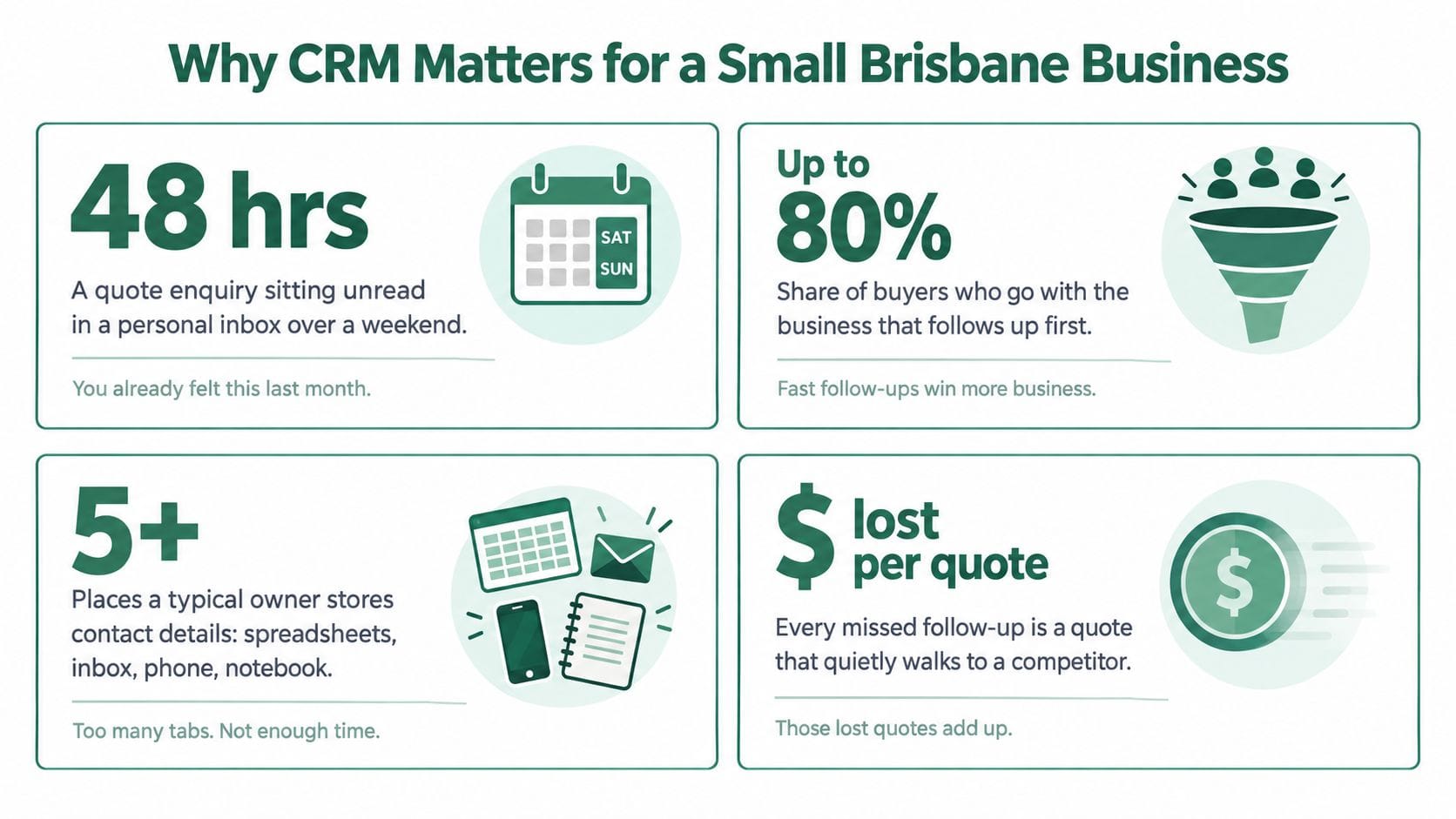
A Brisbane plumbing business might receive a blocked-drain enquiry through its website. The form creates a contact and an opportunity, the owner qualifies the job, a quote is attached to the opportunity, and a calendar task prompts a follow-up. When the customer books, the opportunity becomes Won and the record remains available for future maintenance reminders.
The important distinction is that CRM isn't just the platform. It is the platform plus the agreed routine for recording each meaningful touch. A system with incomplete records is less useful than a modest pipeline that the team updates consistently.
Why CRM Matters for a Small Brisbane Business
Australian CRM adoption is already high. Capterra's Australia directory reports that 93% of Australian businesses use a CRM system, while more than half of Australian employees involved in customer service operations use CRM software for customer calls. Its 2024 Customer Service Technology Survey reported CRM use among 63% of Australian customer-service workers. Those figures mean the competitive question is no longer whether a business owns CRM software. The question is whether the system helps people act on customer information. See the Australian CRM adoption overview.
The cost of an invisible next step
A quote sitting in a personal inbox has no visible owner. The business might believe the job is being handled, while the customer waits and contacts another provider. CRM creates accountability by assigning a status, an owner and a next task.
A returning customer creates a different risk. If the history sits in one employee's memory, a new quote may ignore previous work, earlier concerns or a service opportunity. A shared record gives the operator enough context to continue the relationship without asking the customer to start again.
Marketing also loses efficiency when the customer database is poorly organised. A spreadsheet may contain past buyers, current prospects and people who asked not to receive certain messages, all in the same column. A CRM can separate those groups so a business promotes relevant services rather than sending every contact the same generic campaign.
Australian implementation problems show why this matters. A 2021 report found that 49% of Australian sales professionals believed their CRM was costing revenue, 52% said their CRM was unfit for purpose, and 50% couldn't access customer data across marketing, sales and service systems. Those findings appear in the State of CX in Australia report. The lesson is direct. A CRM that adds admin or keeps information fragmented fails the business.
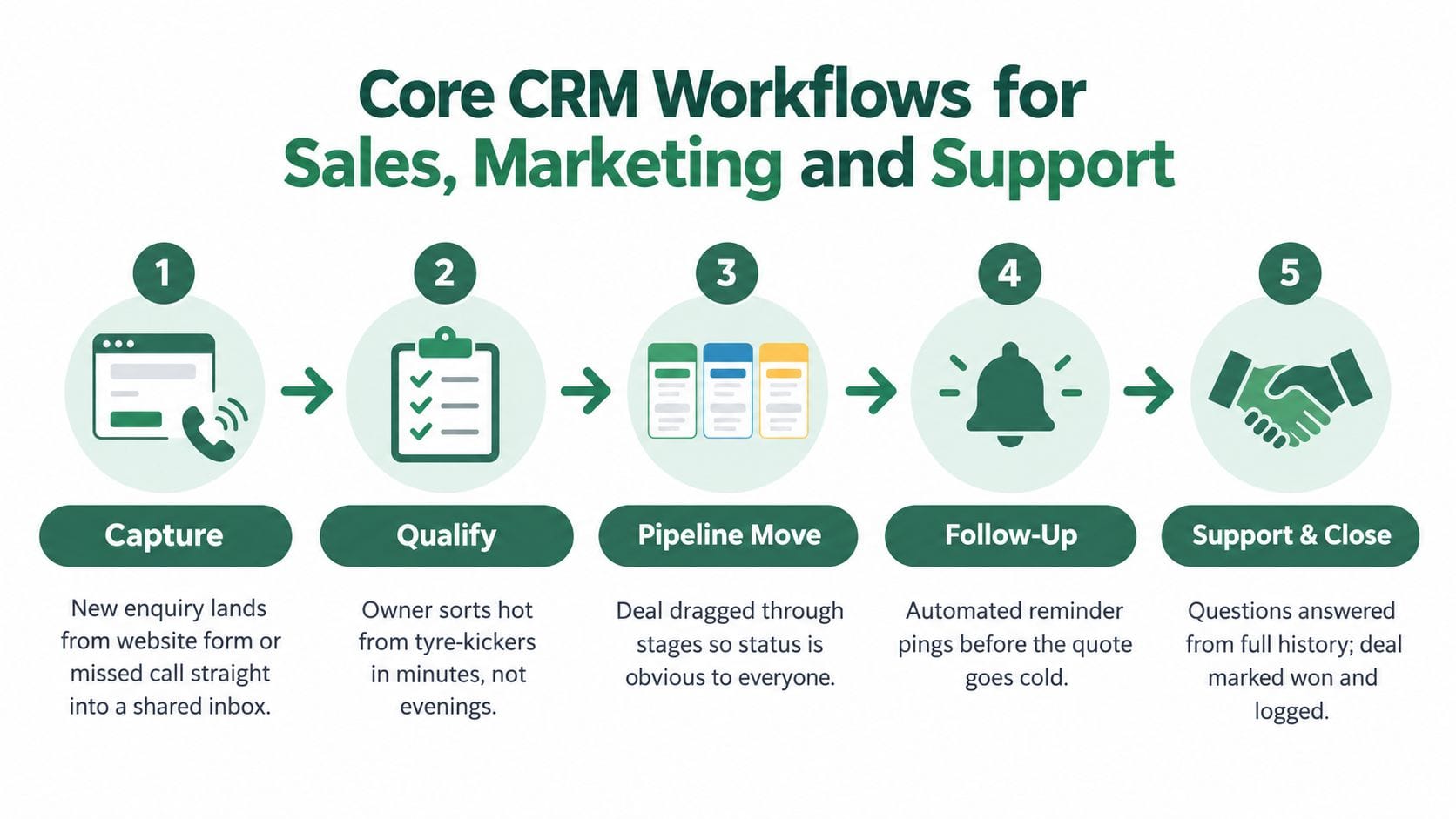
For a Brisbane operator, the most valuable CRM outcomes are practical:
- Faster lead handling: Every enquiry enters a shared queue.
- Stronger quote control: Open opportunities show which quotes need attention.
- Better handovers: Staff can see the conversation without searching several systems.
- More repeat work: Past customers remain visible after the original job closes.
- Clearer marketing decisions: Campaigns can target customer groups with a known history.
The CRM becomes the accountability layer between marketing activity and revenue. SEO, paid advertising and referrals bring people to the door. The workflow determines whether the business answers, quotes, follows up and earns the next job.
Core CRM Workflows for Sales, Marketing and Support
A small business doesn't need a complex enterprise process. It needs three connected workflows that staff can repeat without thinking about the software.
Capture and qualify every enquiry
A website form should create a contact and an opportunity in a shared inbox or CRM queue. A missed call should receive the same treatment, with a task for someone to return it. The record should include the service requested, suburb, source and any urgency noted in the initial message.
Qualification can stay simple. The owner can mark the enquiry as suitable, unsuitable, urgent, awaiting information or ready for a quote. That prevents the pipeline from becoming a list of names with no commercial meaning.
Move the opportunity through visible stages
A service business might use these stages:
- Enquiry: The request has arrived but hasn't been assessed.
- Qualified: The job fits the service, location and capacity.
- Quoted: The customer has received pricing or a proposal.
- Won: The work is booked or completed.
- Lost: The customer declined, chose another provider or stopped responding.
Each stage needs a required action. A quoted opportunity should have a follow-up task. A Won opportunity should record the service delivered and any useful future contact. A Lost opportunity should capture a reason where practical, such as price, timing or poor fit.
Follow up, support and bring customers back
A follow-up task should appear after a quote is sent, not rely on the salesperson remembering it later. A support email should attach to the same customer record, so the person answering can see the original request, quote and previous replies.
Marketing then uses the same history responsibly. A pest-control operator can identify customers due for a seasonal service. A bookkeeper can separate active clients from old enquiries. An accountant can send a useful update to a relevant segment instead of treating every contact as a cold prospect.
The workflow should also connect advertising to outcomes. A guide to Google Ads and CRM integration can help a business think through how campaign leads enter the pipeline and how closed work gets attributed. For account-based teams, tools that track account intelligence alerts can add useful monitoring when customer activity changes.
Support information needs the same discipline as sales information. A customer shouldn't receive a sales pitch while a complaint remains unresolved. A shared record helps the team see the full relationship before sending the next message.
Choosing the Right CRM Approach for Your Business
The right CRM is the smallest system that reliably captures enquiries, manages quotes and preserves customer history. A solo operator doesn't need the same setup as a growing professional-services team, and a feature-heavy platform won't fix a pipeline that nobody updates.
| CRM Approach | Core Strength | Main Weakness | Best Fit |
|---|---|---|---|
| All-in-one suite, such as HubSpot or ActiveCampaign | Connects marketing, sales and support in one environment | More settings, cost and setup decisions | Businesses wanting connected campaigns and customer service |
| Sales-focused CRM, such as Pipedrive or Capsule | Makes quotes, stages and next actions easy to see | Marketing and support may need extra tools | Teams focused on lead follow-up and pipeline control |
| Lightweight pipeline, such as a disciplined Trello or Notion board | Low cost and quick to understand | Limited reporting, integrations and customer history | Solo operators replacing a spreadsheet |
Choose around the work already happening
The first decision is not brand selection. It is workflow fit.
- Existing tools: A business using Google Workspace may value a smooth Gmail and Calendar connection. A business using Microsoft tools needs equivalent support.
- Team size: More staff increases the need for ownership, permissions and handover visibility.
- Quote volume: A high volume of active quotes favours a dedicated sales pipeline over a basic board.
- Accounting connection: Xero or MYOB integration can reduce duplicated customer and invoice entry.
- Mobile use: Tradespeople need a usable phone interface while moving between Brisbane jobs.
- Budget: Subscription cost matters, but so does the cost of staff ignoring an awkward system.
A Trello board can replace a spreadsheet for a solo builder if each card contains the customer, job, quote value, last contact and next task. It becomes inadequate when the business needs email history, segmented campaigns or meaningful reports.
An all-in-one suite suits an operator who wants one connected database for lead capture, email marketing and service. A sales-focused CRM is usually the cleaner choice when the main problem is quote chasing and pipeline visibility. A support-oriented evaluation can benefit from this buyer's guide for support teams, particularly when service conversations need to sit beside sales records.
The best test is a live trial using real enquiries. If staff can't create a contact, update a stage and schedule the next action quickly, the product is wrong for the workflow, regardless of its feature list.
A Practical 30-Day CRM Implementation Plan
A CRM rollout should start with the business process, not a blank software account. Four weeks is enough to create a working foundation when the owner avoids unnecessary customisation.
Week 1 focuses on data clean-up
Export contacts from spreadsheets, inboxes, phones and existing forms. Remove duplicates, correct obvious errors and separate active customers from records that no longer deserve daily attention.
The first version only needs useful fields:
- Customer name and contact details
- Business or household name
- Suburb or service area
- Lead source
- Service or product interest
- Current status
- Last interaction
- Next action
- Consent or communication preference
Don't import every historical note. Archive information that doesn't support a current decision. A smaller, cleaner database is easier for staff to trust.
Week 2 builds the pipeline
Create stages that match the actual sales journey, not an industry template. A Brisbane landscaping business may need Enquiry, Site Visit Booked, Quote Sent, Deposit Received and Completed. A consulting firm may need Discovery, Proposal Sent, Review and Engaged.
Add only the automations that prevent known failures:
- Website enquiries route to the right person.
- New leads create a response task.
- Sent quotes create a follow-up reminder.
- Old customers enter a review or re-engagement list.
- Won deals create a service or repeat-business task.
Week 3 connects the working tools
Connect Gmail or Outlook, the website form, calendar, accounting system and existing quote tool where the integration is reliable. A useful connection removes duplicate entry. A weak connection creates new errors, so every integration should be tested with a real enquiry before launch.
Implementation standard: A connection is finished only when the right record, owner and next task appear without manual detective work.
Week 4 makes adoption routine
Team training should use current enquiries, not abstract demonstrations. Each person needs a short routine: open the assigned queue, update the record after contact, move the opportunity, and schedule the next action.
A two-minute written process near the workstation helps more than a long manual. A Friday review should check whether active opportunities have owners, current stages and future tasks. The guidance on user adoption for CRM success reinforces the importance of making usage part of daily work.
Common rollout failures include importing dirty data, creating too many mandatory fields, automating messages before the team understands the workflow and allowing side-channel notes to continue. Conversion work should connect to the same process. A business reviewing its conversion rate optimisation services should make sure new form submissions reach the CRM rather than stopping at the website inbox.
CRM Metrics Worth Watching and the Ones to Ignore
A small-business CRM should produce decisions, not decorate a dashboard. An owner needs a short review that shows where leads stall, which sources create suitable work and whether existing customers receive useful attention.
| Metric | What It Tells You | What Good Looks Like | Why It Beats a Vanity Number |
|---|---|---|---|
| Lead response time | Whether new enquiries receive timely attention | The queue has no unexplained ageing leads | It points to a staffing or routing action |
| Quote-to-close rate by source | Which channels create viable opportunities | The business can compare sources and investigate weak ones | It connects marketing activity to sales outcomes |
| Repeat purchase rate | Whether customers return after the first job | Past buyers receive relevant follow-up | It highlights retention opportunities |
| Customer lifetime value | The commercial value of a relationship | Higher-value segments receive appropriate care | It supports decisions about service and retention |
| Support resolution time | Whether customer issues move towards closure | Open cases have owners and next actions | It exposes service bottlenecks |
| Revenue per active customer | Whether existing relationships are becoming more valuable | Revenue is reviewed by customer group or service | It informs offers, pricing and account attention |
A weekly pipeline view should show new enquiries, uncontacted records, open quotes and opportunities with no next task. The action is usually obvious. Reassign the queue, call the customer, clarify the quote or close the dead opportunity.
A monthly report can show quote outcomes by lead source and repeat activity by customer segment. It can also reveal that a channel creates many enquiries but few suitable jobs, while a smaller source produces stronger commercial results.
The Australian market context supports this focus on quality. A 2025 Australia-focused directory summary reported that 93% of businesses use CRM, yet only 20% ranked CRM as a top software investment priority in 2025. That gap suggests adoption alone isn't the differentiator. Data quality, workflow integration and user experience matter more. The summary is available in this Australia CRM overview for small businesses.
Raw contact count is usually weak. A larger database doesn't prove stronger relationships. Email open rate in isolation can mislead, social follower growth rarely shows quote quality, and dashboard visits don't pay invoices. A focused review should happen in a 20-minute monthly block, with each metric tied to one operational decision. A business wanting to understand the broader idea of conversion measurement can use this guide to what conversion rate means.
Putting CRM to Work Without Adding to Your Week
A CRM becomes useful when it reduces memory work. This week's rollout can stay small:
- Capture every new enquiry: Create or confirm the record before the first reply.
- Set one follow-up task per active quote: No open quote should depend on memory alone.
- Log repeat buyers: Record completed work, useful preferences and the next sensible reason to contact the customer.
That is enough to expose the biggest leaks. An owner can see which leads are waiting, which quotes have gone quiet and which past customers have a genuine reason for another conversation.
Month two can handle advanced automation, AI summaries, custom dashboards and complex segmentation. None of those additions should delay clean records, visible stages and dependable follow-up. A business should earn the right to automate by first proving that staff can maintain the basic workflow.
Outside help makes sense when the data migration is messy, integrations keep stalling, the team still avoids the CRM after 60 days, or marketing and sales need alignment beyond a basic pipeline. A local agency may also help connect lead capture, SEO, paid advertising and customer follow-up without forcing the owner to manage every platform alone. Businesses comparing practical small business digital marketing packages can include CRM setup and lead handling in that conversation.
Boocoo can be considered as one Brisbane-based option for website lead capture, CRM integration, SEO, social media and paid advertising support. The important choice isn't the agency or platform name. It's whether the business ends each week with fewer unassigned leads, fewer forgotten quotes and a clearer list of customers worth contacting.
Customer relationship management is a weekly operating habit, not a software purchase. A small Brisbane business that captures consistently, follows up visibly and uses customer history responsibly has a practical foundation for turning digital enquiries into booked work and repeat business.